bundles / numpy 2.4.3 /docs
Doc
Scalars
docs/reference:arrays.scalars
Python defines only one type of a particular data class (there is only one integer type, one floating-point type, etc.). This can be convenient in applications that don't need to be concerned with all the ways data can be represented in a computer. For scientific computing, however, more control is often needed.
In NumPy, there are 24 new fundamental Python types to describe different types of scalars. These type descriptors are mostly based on the types available in the C language that CPython is written in, with several additional types compatible with Python's types.
Array scalars have the same attributes and methods as ndarrays. [1] This allows one to treat items of an array partly on the same footing as arrays, smoothing out rough edges that result when mixing scalar and array operations.
Array scalars live in a hierarchy (see the Figure below) of data types. They can be detected using the hierarchy: For example, isinstance(val, np.generic) will return True if val is an array scalar object. Alternatively, what kind of array scalar is present can be determined using other members of the data type hierarchy. Thus, for example isinstance(val, np.complexfloating) will return True if val is a complex valued type, while isinstance(val, np.flexible) will return true if val is one of the flexible itemsize array types (str_, bytes_, void).
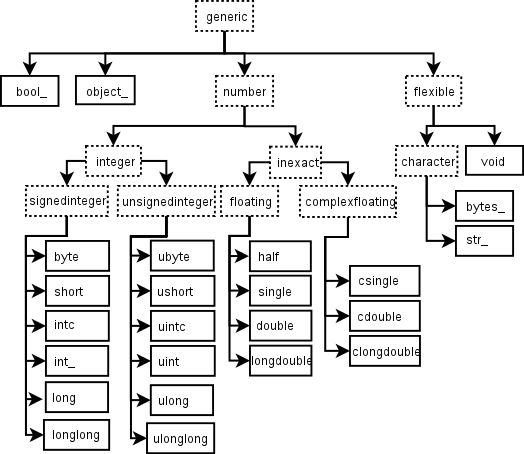
Figure: Hierarchy of type objects representing the array data types. Not shown are the two integer types intp and uintp which are used for indexing (the same as the default integer since NumPy 2).
However, array scalars are immutable, so none of the array scalar attributes are settable.
Built-in scalar types
The built-in scalar types are shown below. The C-like names are associated with character codes, which are shown in their descriptions. Use of the character codes, however, is discouraged.
Some of the scalar types are essentially equivalent to fundamental Python types and therefore inherit from them as well as from the generic array scalar type:
====================  ===========================  =========
Array scalar type     Related Python type          Inherits?
====================  ===========================  =========
:class:`int_`         :class:`int`                 no
:class:`double`       :class:`float`               yes
:class:`cdouble`      :class:`complex`             yes
:class:`bytes_`       :class:`bytes`               yes
:class:`str_`         :class:`str`                 yes
:class:`bool_`        :class:`bool`                no
:class:`datetime64`   :class:`datetime.datetime`   no
:class:`timedelta64`  :class:`datetime.timedelta`  no
====================  ===========================  =========
The bool_ data type is very similar to the Python bool but does not inherit from it because Python's bool does not allow itself to be inherited from, and on the C-level the size of the actual bool data is not the same as a Python Boolean scalar.
Integer types
Signed integer types
Unsigned integer types
Inexact types
Floating-point types
Complex floating-point types
Other types
The following data types are flexible: they have no predefined size and the data they describe can be of different length in different arrays. (In the character codes # is an integer denoting how many elements the data type consists of.)
Sized aliases
Along with their (mostly) C-derived names, the integer, float, and complex data-types are also available using a bit-width convention so that an array of the right size can always be ensured. Two aliases (numpy.intp and numpy.uintp) pointing to the integer type that is sufficiently large to hold a C pointer are also provided.
Aliases for the signed integer types (one of numpy.byte, numpy.short, numpy.intc, numpy.int_, numpy.long and numpy.longlong) with the specified number of bits.
Compatible with the C99
int8_t,int16_t,int32_t, andint64_t, respectively.
Alias for the unsigned integer types (one of numpy.ubyte, numpy.ushort, numpy.uintc, numpy.uint, numpy.ulong and numpy.ulonglong) with the specified number of bits.
Compatible with the C99
uint8_t,uint16_t,uint32_t, anduint64_t, respectively.
Alias for numpy.longdouble, named after its size in bits. The existence of these aliases depends on the platform.
Alias for numpy.clongdouble, named after its size in bits. The existence of these aliases depends on the platform.
Attributes
The array scalar objects have an array priority <class.__array_priority__> of NPY_SCALAR_PRIORITY (-1,000,000.0). They also do not (yet) have a ctypes <ndarray.ctypes> attribute. Otherwise, they share the same attributes as arrays:
.. autosummary::
    :toctree:generated/
    generic.flags
    generic.shape
    generic.strides
    generic.ndim
    generic.data
    generic.size
    generic.itemsize
    generic.base
    generic.dtype
    generic.real
    generic.imag
    generic.flat
    generic.T
    generic.__array_interface__
    generic.__array_struct__
    generic.__array_priority__
    generic.__array_wrap__
Indexing
Array scalars can be indexed like 0-dimensional arrays: if x is an array scalar,
x[()]returns a copy of array scalarx[...]returns a 0-dimensional ndarrayx['field-name']returns the array scalar in the field field-name. (x can have fields, for example, when it corresponds to a structured data type.)
Methods
Array scalars have exactly the same methods as arrays. The default behavior of these methods is to internally convert the scalar to an equivalent 0-dimensional array and to call the corresponding array method. In addition, math operations on array scalars are defined so that the same hardware flags are set and used to interpret the results as for ufunc, so that the error state used for ufuncs also carries over to the math on array scalars.
The exceptions to the above rules are given below:
.. autosummary::
    :toctree:generated/
    generic.__array__
    generic.__array_wrap__
    generic.squeeze
    generic.byteswap
    generic.__reduce__
    generic.__setstate__
    generic.setflags
Utility method for typing:
.. autosummary::
    :toctree:generated/
    number.__class_getitem__
Defining new types
There are two ways to effectively define a new array scalar type (apart from composing structured types dtypes from the built-in scalar types): One way is to simply subclass the ndarray and overwrite the methods of interest. This will work to a degree, but internally certain behaviors are fixed by the data type of the array. To fully customize the data type of an array you need to define a new data-type, and register it with NumPy. Such new types can only be defined in C, using the NumPy C-API.