bundles / scipy 1.17.1 / scipy / ndimage / _morphology / distance_transform_bf
function
scipy.ndimage._morphology:distance_transform_bf
Signature
def distance_transform_bf(input, metric = euclidean, sampling = None, return_distances = True, return_indices = False, distances = None, indices = None)Summary
Distance transform function by a brute force algorithm.
Extended Summary
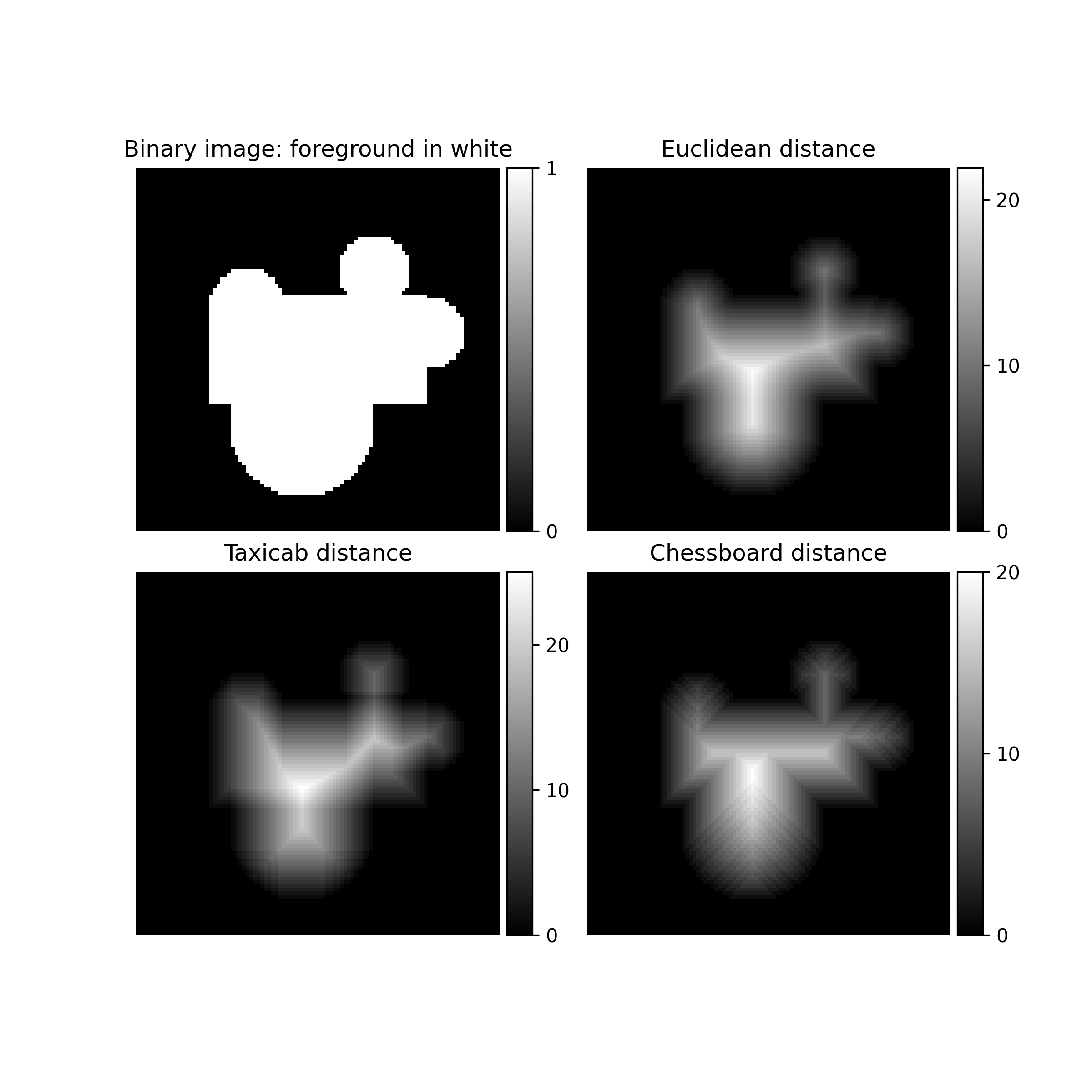
This function calculates the distance transform of the input, by replacing each foreground (non-zero) element, with its shortest distance to the background (any zero-valued element).
In addition to the distance transform, the feature transform can be calculated. In this case the index of the closest background element to each foreground element is returned in a separate array.
Parameters
input: array_likeInput
metric: {'euclidean', 'taxicab', 'chessboard'}, optional'cityblock' and 'manhattan' are also valid, and map to 'taxicab'. The default is 'euclidean'.
sampling: float, or sequence of float, optionalThis parameter is only used when
metricis 'euclidean'. Spacing of elements along each dimension. If a sequence, must be of length equal to the input rank; if a single number, this is used for all axes. If not specified, a grid spacing of unity is implied.return_distances: bool, optionalWhether to calculate the distance transform. Default is True.
return_indices: bool, optionalWhether to calculate the feature transform. Default is False.
distances: ndarray, optionalAn output array to store the calculated distance transform, instead of returning it.
return_distancesmust be True. It must be the same shape asinput, and of type float64 ifmetricis 'euclidean', uint32 otherwise.indices: int32 ndarray, optionalAn output array to store the calculated feature transform, instead of returning it.
return_indiciesmust be True. Its shape must be(input.ndim,) + input.shape.
Returns
distances: ndarray, optionalThe calculated distance transform. Returned only when
return_distancesis True anddistancesis not supplied. It will have the same shape as the input array.indices: int32 ndarray, optionalThe calculated feature transform. It has an input-shaped array for each dimension of the input. See distance_transform_edt documentation for an example. Returned only when
return_indicesis True andindicesis not supplied.
Notes
This function employs a slow brute force algorithm. See also the function distance_transform_cdt for more efficient taxicab [1] and chessboard algorithms [2].
Array API Standard Support
distance_transform_bf has experimental support for Python Array API Standard compatible backends in addition to NumPy. Please consider testing these features by setting an environment variable SCIPY_ARRAY_API=1 and providing CuPy, PyTorch, JAX, or Dask arrays as array arguments. The following combinations of backend and device (or other capability) are supported.
====================  ====================  ====================
Library               CPU                   GPU
====================  ====================  ====================
NumPy                 ✅                     n/a
CuPy                  n/a                   ⛔
PyTorch               ✅                     ⛔
JAX                   ⚠️ no JIT             ⛔
Dask                  ⚠️ computes graph     n/a
====================  ====================  ====================
See
dev-arrayapifor more information.
Examples
Import the necessary modules.import numpy as np from scipy.ndimage import distance_transform_bf import matplotlib.pyplot as plt from mpl_toolkits.axes_grid1 import ImageGrid✓
def add_circle(center_x, center_y, radius, image, fillvalue=1):
    # fill circular area with 1
    xx, yy = np.mgrid[:image.shape[0], :image.shape[1]]
    circle = (xx - center_x) ** 2 + (yy - center_y) ** 2
    circle_shape = np.sqrt(circle) < radius
    image[circle_shape] = fillvalue
    return image
image = np.zeros((100, 100), dtype=np.uint8)
image[35:65, 20:80] = 1
image = add_circle(28, 65, 10, image)
image = add_circle(37, 30, 10, image)
image = add_circle(70, 45, 20, image)
image = add_circle(45, 80, 10, image)
✓
fig = plt.figure(figsize=(8, 8))  # set up the figure structure
grid = ImageGrid(fig, 111, nrows_ncols=(2, 2), axes_pad=(0.4, 0.3),
                 label_mode="1", share_all=True,
                 cbar_location="right", cbar_mode="each",
                 cbar_size="7%", cbar_pad="2%")
✓
for ax in grid:
    ax.axis('off')  # remove axes from images
✗
binary_image = grid[0].imshow(image, cmap='gray')
cbar_binary_image = grid.cbar_axes[0].colorbar(binary_image)
cbar_binary_image.set_ticks([0, 1])
✓
grid[0].set_title("Binary image: foreground in white")
✗distance_transform_euclidean = distance_transform_bf(image) euclidean_transform = grid[1].imshow(distance_transform_euclidean, cmap='gray') cbar_euclidean = grid.cbar_axes[1].colorbar(euclidean_transform) colorbar_ticks = [0, 10, 20] cbar_euclidean.set_ticks(colorbar_ticks)✓
grid[1].set_title("Euclidean distance")
✗distance_transform_taxicab = distance_transform_bf(image, metric='taxicab') taxicab_transformation = grid[2].imshow(distance_transform_taxicab, cmap='gray') cbar_taxicab = grid.cbar_axes[2].colorbar(taxicab_transformation) cbar_taxicab.set_ticks(colorbar_ticks)✓
grid[2].set_title("Taxicab distance")
✗distance_transform_cb = distance_transform_bf(image, metric='chessboard') chessboard_transformation = grid[3].imshow(distance_transform_cb, cmap='gray') cbar_taxicab = grid.cbar_axes[3].colorbar(chessboard_transformation) cbar_taxicab.set_ticks(colorbar_ticks)✓
grid[3].set_title("Chessboard distance")
✗plt.show()
✓
See also
- distance_transform_cdt
Faster distance transform for taxicab and chessboard metrics
- distance_transform_edt
Faster distance transform for euclidean metric
Aliases
scipy.ndimage.distance_transform_bf