bundles / scipy 1.17.1 / scipy / signal / _peak_finding / peak_widths
function
scipy.signal._peak_finding:peak_widths
Signature
def peak_widths(x, peaks, rel_height = 0.5, prominence_data = None, wlen = None)Summary
Calculate the width of each peak in a signal.
Extended Summary
This function calculates the width of a peak in samples at a relative distance to the peak's height and prominence.
Parameters
x: sequenceA signal with peaks.
peaks: sequenceIndices of peaks in
x.rel_height: float, optionalChooses the relative height at which the peak width is measured as a percentage of its prominence. 1.0 calculates the width of the peak at its lowest contour line while 0.5 evaluates at half the prominence height. Must be at least 0. See notes for further explanation.
prominence_data: tuple, optionalA tuple of three arrays matching the output of peak_prominences when called with the same arguments
xandpeaks. This data are calculated internally if not provided.wlen: int, optionalA window length in samples passed to peak_prominences as an optional argument for internal calculation of
prominence_data. This argument is ignored ifprominence_datais given.
Returns
widths: ndarrayThe widths for each peak in samples.
width_heights: ndarrayThe height of the contour lines at which the widths where evaluated.
left_ips, right_ips: ndarrayInterpolated positions of left and right intersection points of a horizontal line at the respective evaluation height.
Raises
: ValueErrorIf
prominence_datais supplied but doesn't satisfy the condition0 <= left_base <= peak <= right_base < x.shape[0]for each peak, has the wrong dtype, is not C-contiguous or does not have the same shape.
Warns
: PeakPropertyWarningRaised if any calculated width is 0. This may stem from the supplied
prominence_dataor ifrel_heightis set to 0.
Warnings
This function may return unexpected results for data containing NaNs. To avoid this, NaNs should either be removed or replaced.
Notes
The basic algorithm to calculate a peak's width is as follows:
Calculate the evaluation height with the formula , where is the height of the peak itself, is the peak's prominence and a positive ratio specified with the argument
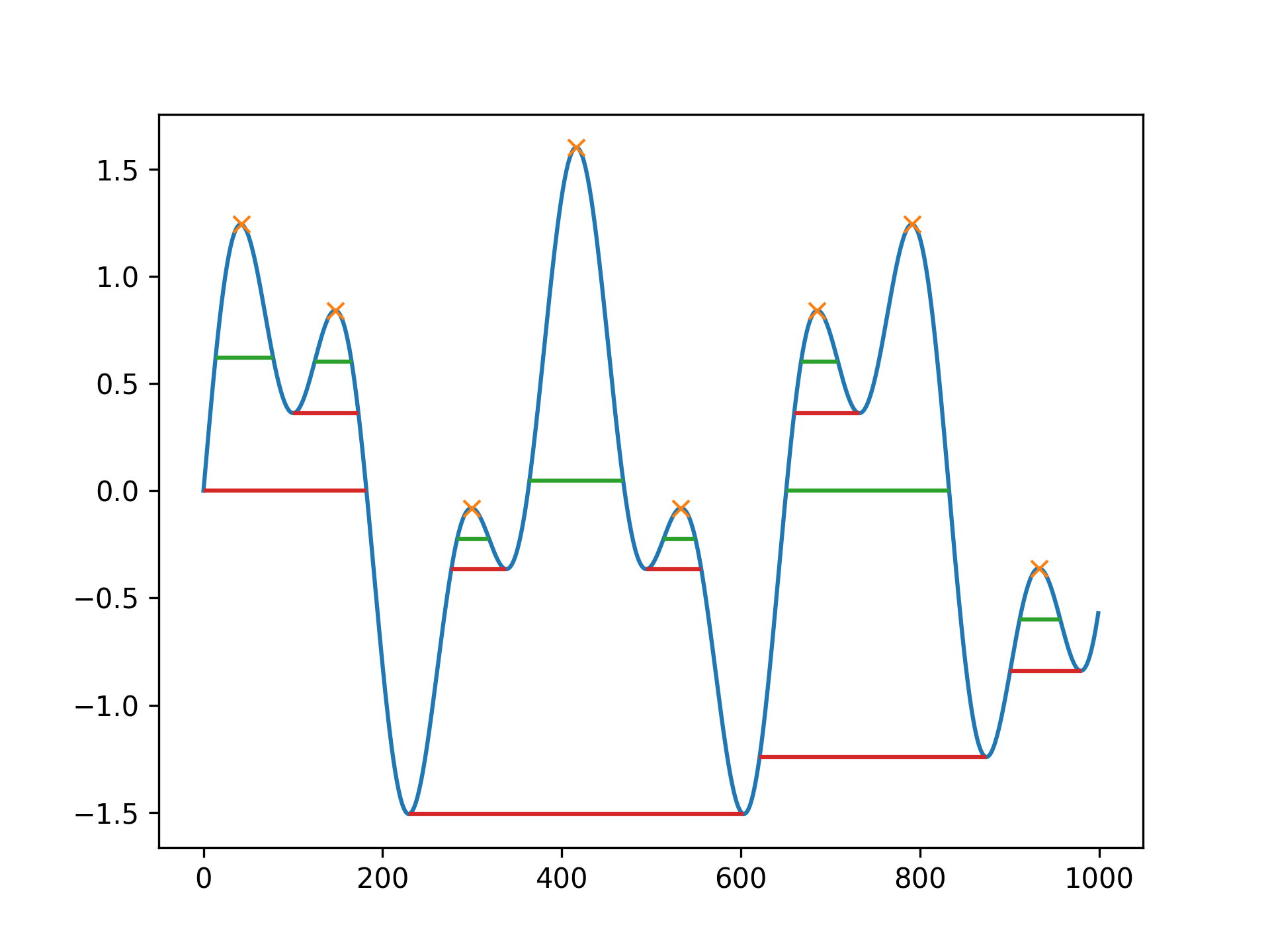
rel_height.Draw a horizontal line at the evaluation height to both sides, starting at the peak's current vertical position until the lines either intersect a slope, the signal border or cross the vertical position of the peak's base (see peak_prominences for an definition). For the first case, intersection with the signal, the true intersection point is estimated with linear interpolation.
Calculate the width as the horizontal distance between the chosen endpoints on both sides. As a consequence of this the maximal possible width for each peak is the horizontal distance between its bases.
As shown above to calculate a peak's width its prominence and bases must be known. You can supply these yourself with the argument prominence_data. Otherwise, they are internally calculated (see peak_prominences).
Array API Standard Support
peak_widths has experimental support for Python Array API Standard compatible backends in addition to NumPy. Please consider testing these features by setting an environment variable SCIPY_ARRAY_API=1 and providing CuPy, PyTorch, JAX, or Dask arrays as array arguments. The following combinations of backend and device (or other capability) are supported.
====================  ====================  ====================
Library               CPU                   GPU
====================  ====================  ====================
NumPy                 ✅                     n/a
CuPy                  n/a                   ⛔
PyTorch               ⛔                     ⛔
JAX                   ⛔                     ⛔
Dask                  ⛔                     n/a
====================  ====================  ====================
See
dev-arrayapifor more information.
Examples
import numpy as np
from scipy.signal import chirp, find_peaks, peak_widths
import matplotlib.pyplot as plt
✓
x = np.linspace(0, 6 * np.pi, 1000)
x = np.sin(x) + 0.6 * np.sin(2.6 * x)
✓
peaks, _ = find_peaks(x)
results_half = peak_widths(x, peaks, rel_height=0.5)
results_half[0]  # widths
results_full = peak_widths(x, peaks, rel_height=1)
✓
results_full[0] # widths
✗plt.plot(x) plt.plot(peaks, x[peaks], "x") plt.hlines(*results_half[1:], color="C2") plt.hlines(*results_full[1:], color="C3")✗
plt.show()
✓
See also
- find_peaks
Find peaks inside a signal based on peak properties.
- peak_prominences
Calculate the prominence of peaks.
Aliases
scipy.signal.peak_widths