bundles / scipy 2.0.0.dev0+git20260907.41eeb59 / scipy / ndimage / _interpolation / rotate
function
scipy.ndimage._interpolation:rotate
source: build-install/usr/lib/python3.14/site-packages/scipy/ndimage/_interpolation.py:897
Signature
def rotate(input, angle, axes = (1, 0), reshape = True, output = None, order = 3, mode = constant, cval = 0.0, prefilter = True)Summary
Rotate an array.
Extended Summary
The array is rotated in the plane defined by the two axes given by the axes parameter using spline interpolation of the requested order.
Parameters
input: array_likeThe input array.
angle: floatThe rotation angle in degrees.
axes: tuple of 2 ints, optionalThe two axes that define the plane of rotation. Default is the first two axes.
reshape: bool, optionalIf
reshapeis true, the output shape is adapted so that the input array is contained completely in the output. Default is True.output: array or dtype, optionalThe array in which to place the output, or the dtype of the returned array. By default an array of the same dtype as input will be created.
order: int, optionalThe order of the spline interpolation, default is 3. The order has to be in the range 0-5.
mode: {'reflect', 'grid-mirror', 'constant', 'grid-constant', 'nearest', 'mirror', 'grid-wrap', 'wrap'}, optionalThe
modeparameter determines how the input array is extended beyond its boundaries. Default is 'constant'. Behavior for each valid value is as follows (see additional plots and details on boundary modes):'reflect' (
d c b a | a b c d | d c b a)The input is extended by reflecting about the edge of the last pixel. This mode is also sometimes referred to as half-sample symmetric.
'grid-mirror'
This is a synonym for 'reflect'.
'constant' (
k k k k | a b c d | k k k k)The input is extended by filling all values beyond the edge with the same constant value, defined by the
cvalparameter. No interpolation is performed beyond the edges of the input.'grid-constant' (
k k k k | a b c d | k k k k)The input is extended by filling all values beyond the edge with the same constant value, defined by the
cvalparameter. Interpolation occurs for samples outside the input's extent as well.'nearest' (
a a a a | a b c d | d d d d)The input is extended by replicating the last pixel.
'mirror' (
d c b | a b c d | c b a)The input is extended by reflecting about the center of the last pixel. This mode is also sometimes referred to as whole-sample symmetric.
'grid-wrap' (
a b c d | a b c d | a b c d)The input is extended by wrapping around to the opposite edge.
'wrap' (
b c d b c | a b c d | b c a b c)The input is extended by wrapping around to the opposite edge, but in a way such that the last point and initial point exactly overlap. In this case it is not well defined which sample will be chosen at the point of overlap.
For the example illustrated above, the edge values
aanddoverlap, while the inner patternb crepeats. The example demonstrates one possible output, whileb c a b c | a b c d | b c d b cis another, since eitheraordmay occur at each point of overlap.
cval: scalar, optionalValue to fill past edges of input if
modeis 'constant'. Default is 0.0.prefilter: bool, optionalDetermines if the input array is prefiltered with spline_filter before interpolation. The default is True, which will create a temporary
float64array of filtered values iforder > 1. If setting this to False, the output will be slightly blurred iforder > 1, unless the input is prefiltered, i.e. it is the result of calling spline_filter on the original input.
Returns
rotate: ndarrayThe rotated input.
Notes
For complex-valued input, this function rotates the real and imaginary components independently.
Examples
from scipy import ndimage, datasets
import matplotlib.pyplot as plt
fig = plt.figure(figsize=(10, 3))
ax1, ax2, ax3 = fig.subplots(1, 3)
img = datasets.ascent()
img_45 = ndimage.rotate(img, 45, reshape=False)
full_img_45 = ndimage.rotate(img, 45, reshape=True)
✓
ax1.imshow(img, cmap='gray')
✗<matplotlib.image.AxesImage object at 0x7f3f68562990>
ax1.set_axis_off()
✓ax2.imshow(img_45, cmap='gray')
✗<matplotlib.image.AxesImage object at 0x7f3f68560910>
ax2.set_axis_off()
✓ax3.imshow(full_img_45, cmap='gray')
✗<matplotlib.image.AxesImage object at 0x7f3f68563c50>
ax3.set_axis_off()
fig.set_layout_engine('tight')
plt.show()
✓
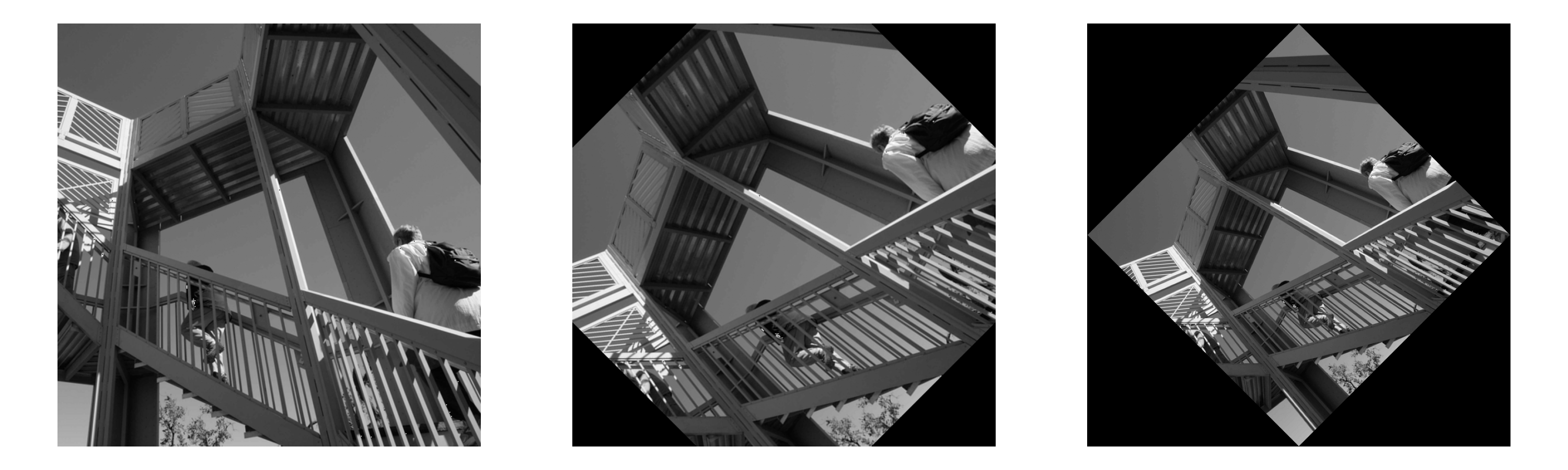
print(img.shape)
print(img_45.shape)
print(full_img_45.shape)
✓
(724, 724)
Aliases
scipy.ndimage.rotate