bundles / scipy latest /docs
Doc
tutorial:interpolate:ND_unstructured
docs/tutorial:interpolate:ND_unstructured
Scattered data interpolation (griddata)
Suppose you have multidimensional data, for instance, for an underlying function you only know the values at points (x[i], y[i]) that do not form a regular grid.
Suppose we want to interpolate the 2-D function

>>> import numpy as np
>>> def func(x, y):
...     return x*(1-x)*np.cos(4*np.pi*x) * np.sin(4*np.pi*y**2)**2

on a grid in [0, 1]x[0, 1]

>>> grid_x, grid_y = np.meshgrid(np.linspace(0, 1, 100),
...                              np.linspace(0, 1, 200), indexing='ij')

but we only know its values at 1000 data points:

>>> rng = np.random.default_rng()
>>> points = rng.random((1000, 2))
>>> values = func(points[:,0], points[:,1])

This can be done with `griddata` -- below, we try out all of the
interpolation methods:

>>> from scipy.interpolate import griddata
>>> grid_z0 = griddata(points, values, (grid_x, grid_y), method='nearest')
>>> grid_z1 = griddata(points, values, (grid_x, grid_y), method='linear')
>>> grid_z2 = griddata(points, values, (grid_x, grid_y), method='cubic')

One can see that the exact result is reproduced by all of the
methods to some degree, but for this smooth function the piecewise
cubic interpolant gives the best results (black dots show the data being
interpolated):

>>> import matplotlib.pyplot as plt
>>> plt.subplot(221)
>>> plt.imshow(func(grid_x, grid_y).T, extent=(0, 1, 0, 1), origin='lower')
>>> plt.plot(points[:, 0], points[:, 1], 'k.', ms=1)   # data
>>> plt.title('Original')
>>> plt.subplot(222)
>>> plt.imshow(grid_z0.T, extent=(0, 1, 0, 1), origin='lower')
>>> plt.title('Nearest')
>>> plt.subplot(223)
>>> plt.imshow(grid_z1.T, extent=(0, 1, 0, 1), origin='lower')
>>> plt.title('Linear')
>>> plt.subplot(224)
>>> plt.imshow(grid_z2.T, extent=(0, 1, 0, 1), origin='lower')
>>> plt.title('Cubic')
>>> plt.gcf().set_size_inches(6, 6)
>>> plt.show()
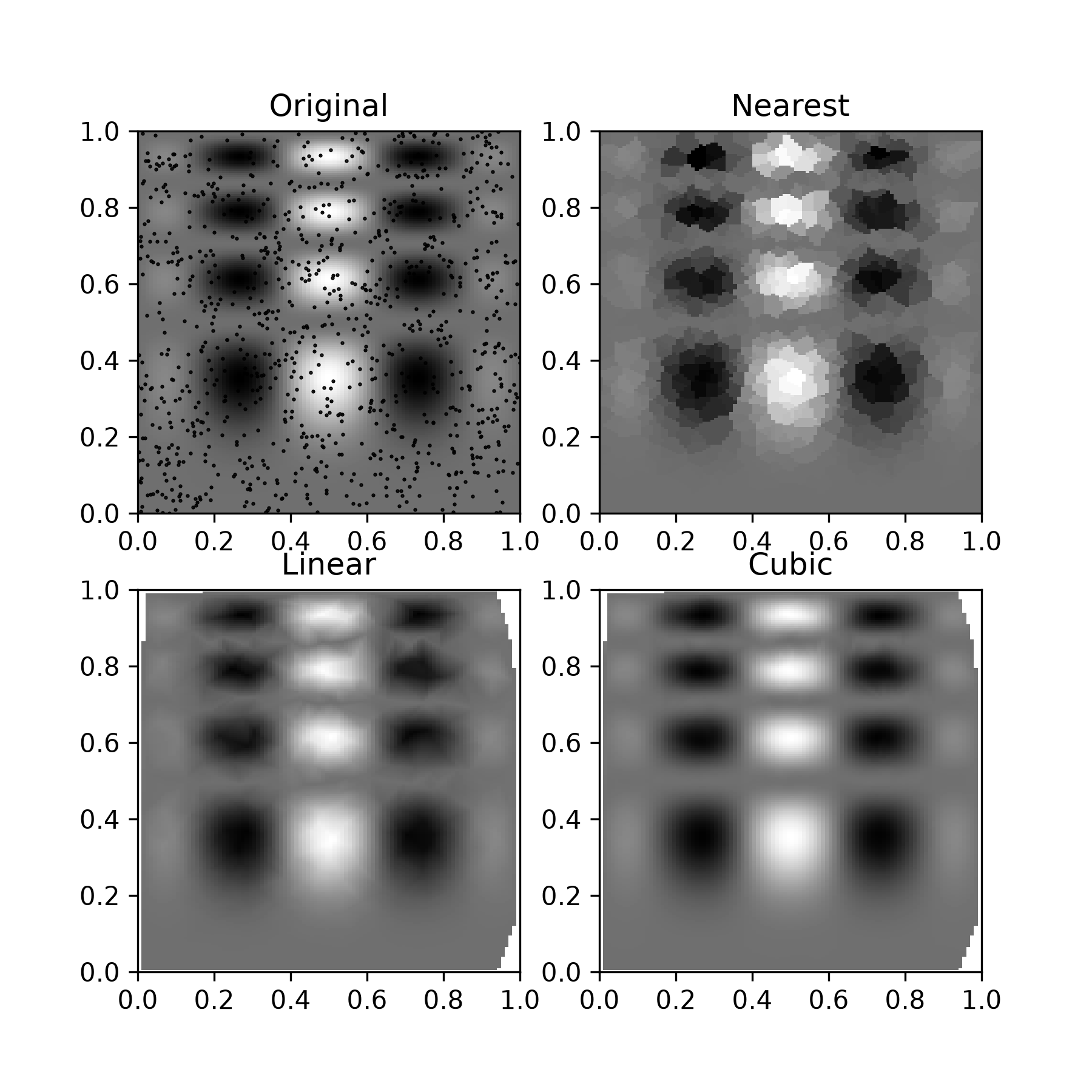
For each interpolation method, this function delegates to a corresponding class object --- these classes can be used directly as well --- NearestNDInterpolator, LinearNDInterpolator and CloughTocher2DInterpolator for piecewise cubic interpolation in 2D.
All these interpolation methods rely on triangulation of the data using the QHull library wrapped in scipy.spatial.
Using radial basis functions for smoothing/interpolation
Radial basis functions can be used for smoothing/interpolating scattered data in N dimensions, but should be used with caution for extrapolation outside of the observed data range.
1-D Example
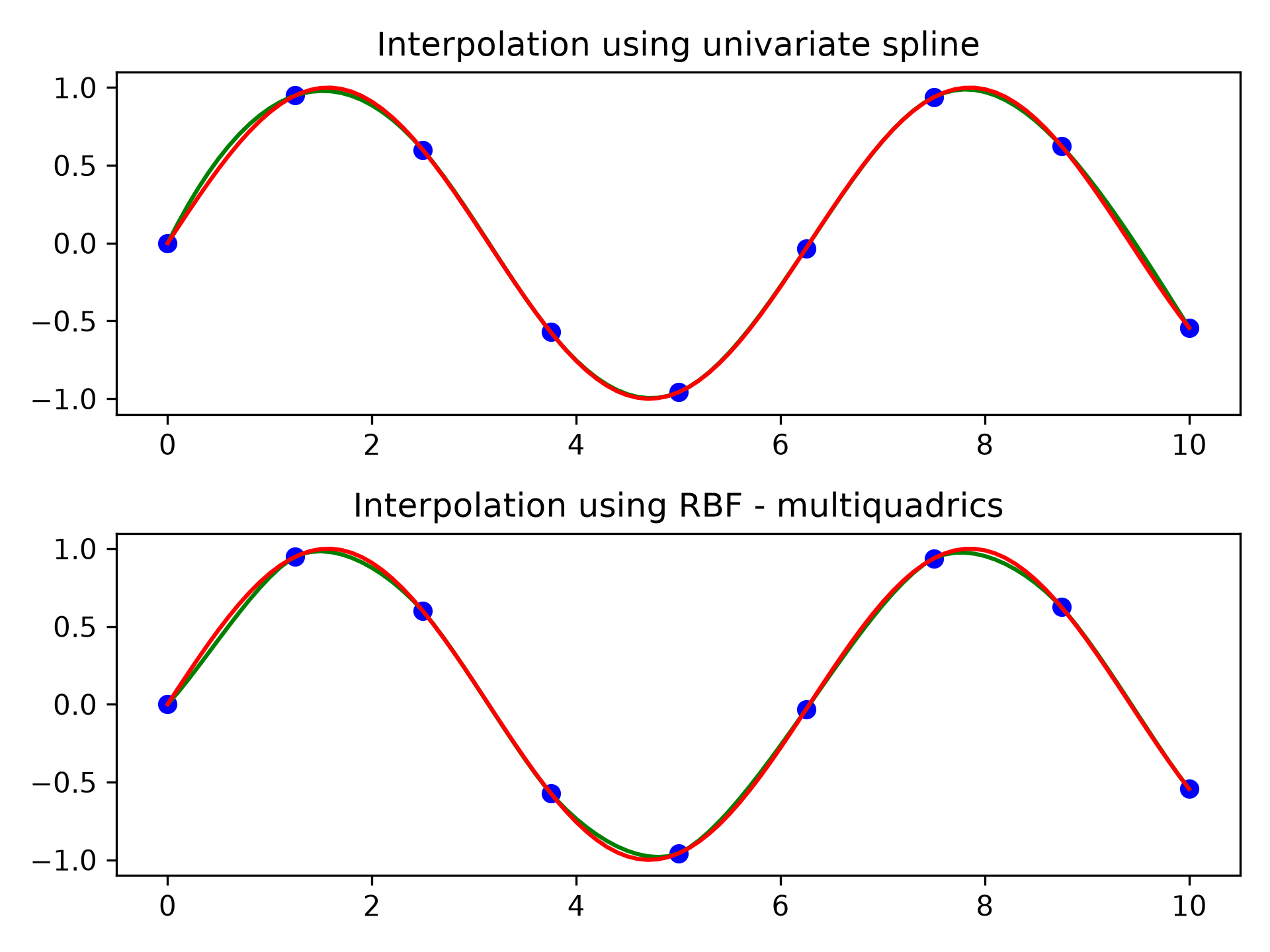
This example compares the usage of the RBFInterpolator and UnivariateSpline classes from the scipy.interpolate module.
>>> import numpy as np
>>> from scipy.interpolate import RBFInterpolator, InterpolatedUnivariateSpline
>>> import matplotlib.pyplot as plt

>>> # setup data
>>> x = np.linspace(0, 10, 9).reshape(-1, 1)
>>> y = np.sin(x)
>>> xi = np.linspace(0, 10, 101).reshape(-1, 1)

>>> # use fitpack2 method
>>> ius = InterpolatedUnivariateSpline(x, y)
>>> yi = ius(xi)

>>> fig, (ax1, ax2) = plt.subplots(2, 1)
>>> ax1.plot(x, y, 'bo')
>>> ax1.plot(xi, yi, 'g')
>>> ax1.plot(xi, np.sin(xi), 'r')
>>> ax1.set_title('Interpolation using univariate spline')

>>> # use RBF method
>>> rbf = RBFInterpolator(x, y)
>>> fi = rbf(xi)

>>> ax2.plot(x, y, 'bo')
>>> ax2.plot(xi, fi, 'g')
>>> ax2.plot(xi, np.sin(xi), 'r')
>>> ax2.set_title('Interpolation using RBF - multiquadrics')
>>> plt.tight_layout()
>>> plt.show()
2-D Example
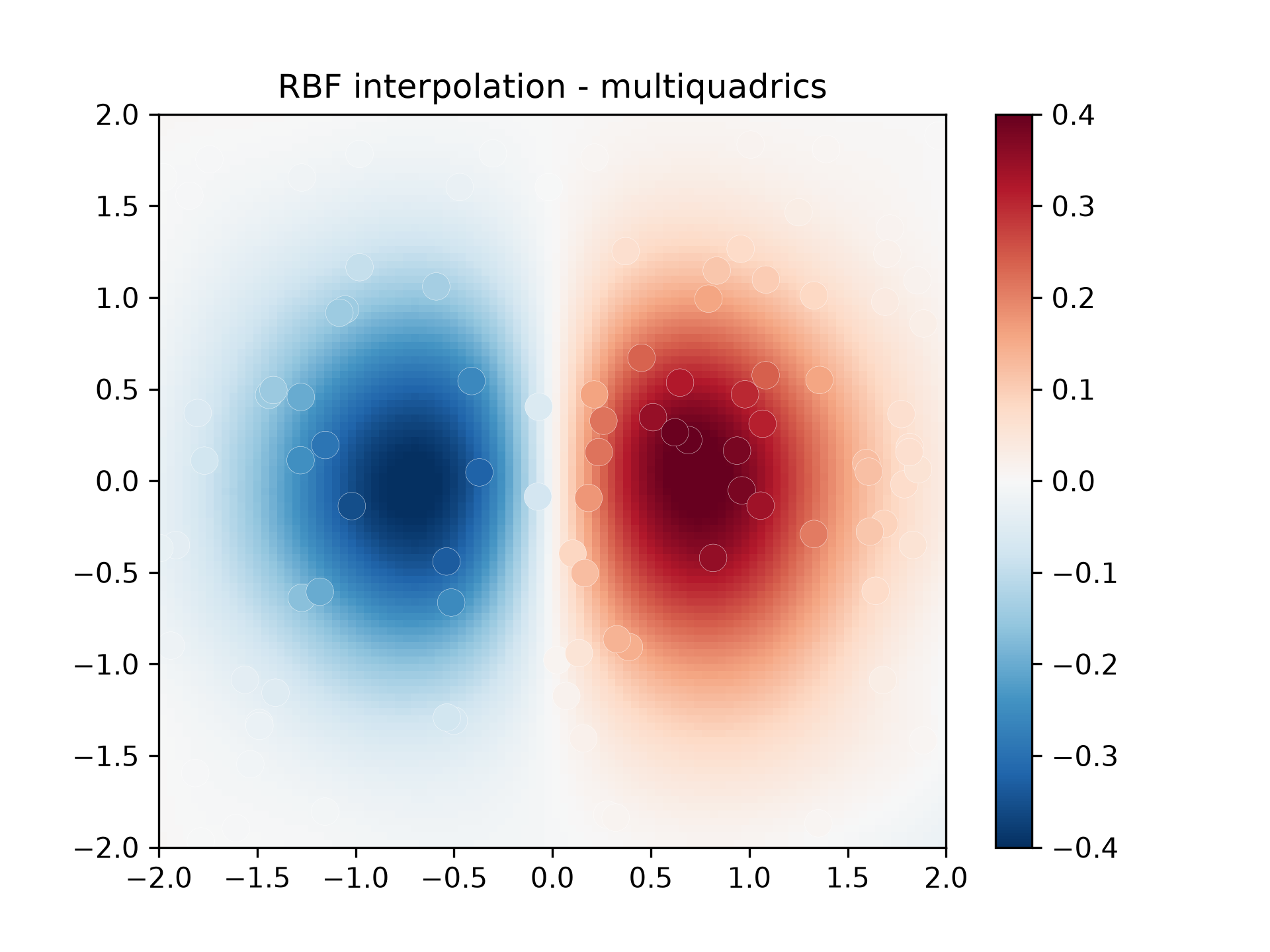
This example shows how to interpolate scattered 2-D data:
>>> import numpy as np
>>> from scipy.interpolate import RBFInterpolator
>>> import matplotlib.pyplot as plt

>>> # 2-d tests - setup scattered data
>>> rng = np.random.default_rng()
>>> xy = rng.random((100, 2))*4.0-2.0
>>> z = xy[:, 0]*np.exp(-xy[:, 0]**2-xy[:, 1]**2)
>>> edges = np.linspace(-2.0, 2.0, 101)
>>> centers = edges[:-1] + np.diff(edges[:2])[0] / 2.
>>> x_i, y_i = np.meshgrid(centers, centers)
>>> x_i = x_i.reshape(-1, 1)
>>> y_i = y_i.reshape(-1, 1)
>>> xy_i = np.concatenate([x_i, y_i], axis=1)

>>> # use RBF
>>> rbf = RBFInterpolator(xy, z, epsilon=2)
>>> z_i = rbf(xy_i)

>>> # plot the result
>>> fig, ax = plt.subplots()
>>> X_edges, Y_edges = np.meshgrid(edges, edges)
>>> lims = dict(cmap='RdBu_r', vmin=-0.4, vmax=0.4)
>>> mapping = ax.pcolormesh(
...     X_edges, Y_edges, z_i.reshape(100, 100),
...     shading='flat', **lims
... )
>>> ax.scatter(xy[:, 0], xy[:, 1], 100, z, edgecolor='w', lw=0.1, **lims)
>>> ax.set(
...     title='RBF interpolation - multiquadrics',
...     xlim=(-2, 2),
...     ylim=(-2, 2),
... )
>>> fig.colorbar(mapping)
Using Custom Kernels
It is possible to extend RBFInterpolator with user supplied kernels which are passed using function pointers and scipy.LowLevelCallable to wrap a compiled kernel with signature double (double), where the argument is the scalar distance r. Both epsilon and degree must be supplied explicitly; neither has a default.
This can be done usig pythran to compile python to C++ or by directly writing and compile a C/C++ function.
Pythran
Use [pythran] and expose it as a capsule
# custom_kernel.py
import numpy as np

def my_kernel(r):
    return np.exp(-r ** 2) * r

# pythran export capsule my_kernel(float64)
Compile with pythran
pythran custom_kernel.pyThen in wrap the function in a LowLevelCallable
from custom_kernel import my_kernel  # capsule object
from scipy import LowLevelCallable

llc = LowLevelCallable(my_kernel, signature="double (double)")

interp = RBFInterpolator(y, d, kernel=llc, epsilon=1.0, degree=0)
C/C++
// custom_kernel.c
#include <math.h>
double my_kernel(double r) {
    return exp(-r * r) / r;
}
Compile
clang -shared -fPIC -O3 -o custom_kernel.dylib custom_kernel.cThen wrap the function in a LowLevelCallable
import ctypes
from scipy import LowLevelCallable
from scipy.interpolate import RBFInterpolator

lib = ctypes.CDLL('./custom_kernel.dylib')
lib.my_kernel.restype  = ctypes.c_double
lib.my_kernel.argtypes = [ctypes.c_double]

llc = LowLevelCallable(lib.my_kernel)
interp = RBFInterpolator(y, d, kernel=llc, epsilon=1.0, degree=0)
References
https://pythran.readthedocs.io/en/latest/examples/Third%20Party%20Libraries.html#With-Pythran