bundles / scipy 2.0.0.dev0+git20260907.41eeb59 / scipy / spatial / transform / _rotation / Rotation
class
scipy.spatial.transform._rotation:Rotation
source: build-install/usr/lib/python3.14/site-packages/scipy/spatial/transform/_rotation.py:68
Signature
class Rotation(quat: ArrayLike, normalize: bool = True, copy: bool = True, scalar_first: bool = False)Members
__bool____getitem____getstate____init____iter____len____mul____pow____repr____setitem____setstate___from_raw_quatalign_vectorsapplyapprox_equalas_davenportas_euleras_matrixas_mrpas_quatas_rotvecconcatenatecreate_groupfrom_davenportfrom_eulerfrom_matrixfrom_mrpfrom_quatfrom_rotvecidentityinvmagnitudemeanrandomreduce
Summary
Rotation in 3 dimensions.
Extended Summary
This class provides an interface to initialize from and represent rotations with:
Quaternions
Rotation Matrices
Rotation Vectors
Modified Rodrigues Parameters
Euler Angles
Davenport Angles (Generalized Euler Angles)
The following operations on rotations are supported:
Application on vectors
Rotation Composition
Rotation Inversion
Rotation Indexing
A Rotation instance can contain a single rotation transform or rotations of multiple leading dimensions. E.g., it is possible to have an N-dimensional array of (N, M, K) rotations. When applied to other rotations or vectors, standard broadcasting rules apply.
Indexing within a rotation is supported to access a subset of the rotations stored in a Rotation instance.
To create Rotation objects use from_... methods (see examples below). Rotation(...) is not supposed to be instantiated directly.
Parameters
quat: array_like, shape (..., 4)Quaternion representing the rotation.
normalize: bool, optionalIf True, orthonormalize the rotation matrix using singular value decomposition. If False, the rotation matrix is not checked for orthogonality or right-handedness.
copy: bool, optionalIf True, copy the input matrix. If False, a reference to the input matrix is used. If normalize is True, the input matrix is always copied regardless of the value of copy.
scalar_first: bool, optionalIf
Truethenquatis expect in scalar-first format otherwise it is expected in scalar-last format. Defaults toFalse.
Attributes
single
Methods
__len__from_quatfrom_matrixfrom_rotvecfrom_mrpfrom_eulerfrom_davenportas_quatas_matrixas_rotvecas_mrpas_euleras_davenportconcatenateapply__mul____pow__invmagnitudeapprox_equalmeanreducecreate_group__getitem__identityrandomalign_vectors
Notes
Examples
from scipy.spatial.transform import Rotation as R
import numpy as np
✓
r = R.from_quat([0, 0, np.sin(np.pi/4), np.cos(np.pi/4)])
✓r.as_matrix() r.as_rotvec() r.as_euler('zyx', degrees=True)✗
array([90., 0., -0.])The same rotation can be initialized using a rotation matrix:
r = R.from_matrix([[0, -1, 0],
                   [1, 0, 0],
                   [0, 0, 1]])
✓
r.as_quat()
r.as_rotvec()
r.as_euler('zyx', degrees=True)
✗
array([90., 0., -0.])The rotation vector corresponding to this rotation is given by:
r = R.from_rotvec(np.pi/2 * np.array([0, 0, 1]))
✓r.as_quat() r.as_matrix() r.as_euler('zyx', degrees=True)✗
array([90., 0., -0.])The ``from_euler`` method is quite flexible in the range of input formats it supports. Here we initialize a single rotation about a single axis:
r = R.from_euler('z', 90, degrees=True)
✓r.as_quat() r.as_matrix() r.as_rotvec()✗
array([0. , 0. , 1.5708])It is also possible to initialize multiple rotations in a single instance using any of the ``from_...`` functions. Here we initialize a stack of 3 rotations using the ``from_euler`` method:
r = R.from_euler('zyx', [
[90, 0, 0],
[0, 45, 0],
[45, 60, 30]], degrees=True)
✓
r.as_quat()
✗array([[0. , 0. , 0.70711, 0.70711],
[0. , 0.38268, 0. , 0.92388],
[0.3919 , 0.36042, 0.43968, 0.72332]])
Applying the above rotations onto a vector:
v = [1, 2, 3]
✓r.apply(v)
✗array([[-2. , 1. , 3. ],
[ 2.82843, 2. , 1.41421],
[ 2.24452, 0.78093, 2.89003]])
A `Rotation` instance can be indexed and sliced as if it were an ND array:
r.as_quat()
✗array([[0. , 0. , 0.70711, 0.70711],
[0. , 0.38268, 0. , 0.92388],
[0.3919 , 0.36042, 0.43968, 0.72332]])
p = r[0]
✓p.as_matrix()
✗array([[ 0., -1., 0.],
[ 1., 0., 0.],
[ 0., 0., 1.]])
q = r[1:3]
✓q.as_quat()
✗array([[0. , 0.38268, 0. , 0.92388],
[0.3919 , 0.36042, 0.43968, 0.72332]])
In fact it can be converted to numpy.array:
r_array = np.asarray(r)
r_array.shape
✓
(3,)
r_array[0].as_matrix()
✗array([[ 0., -1., 0.],
[ 1., 0., 0.],
[ 0., 0., 1.]])
Multiple rotations can be composed using the ``*`` operator:
r1 = R.from_euler('z', 90, degrees=True)
r2 = R.from_rotvec([np.pi/4, 0, 0])
v = [1, 2, 3]
✓
r2.apply(r1.apply(v))
✗array([-2. , -1.41421, 2.82843])
r3 = r2 * r1 # Note the order
✓r3.apply(v)
✗array([-2. , -1.41421, 2.82843])A rotation can be composed with itself using the ``**`` operator:
p = R.from_rotvec([1, 0, 0])
q = p ** 2
q.as_rotvec()
✓
array([2., 0., 0.])Finally, it is also possible to invert rotations:
r1 = R.from_euler('z', [[90], [45]], degrees=True)
r2 = r1.inv()
✓
r2.as_euler('zyx', degrees=True)
✗array([[-90., 0., -0.],
[-45., 0., -0.]])
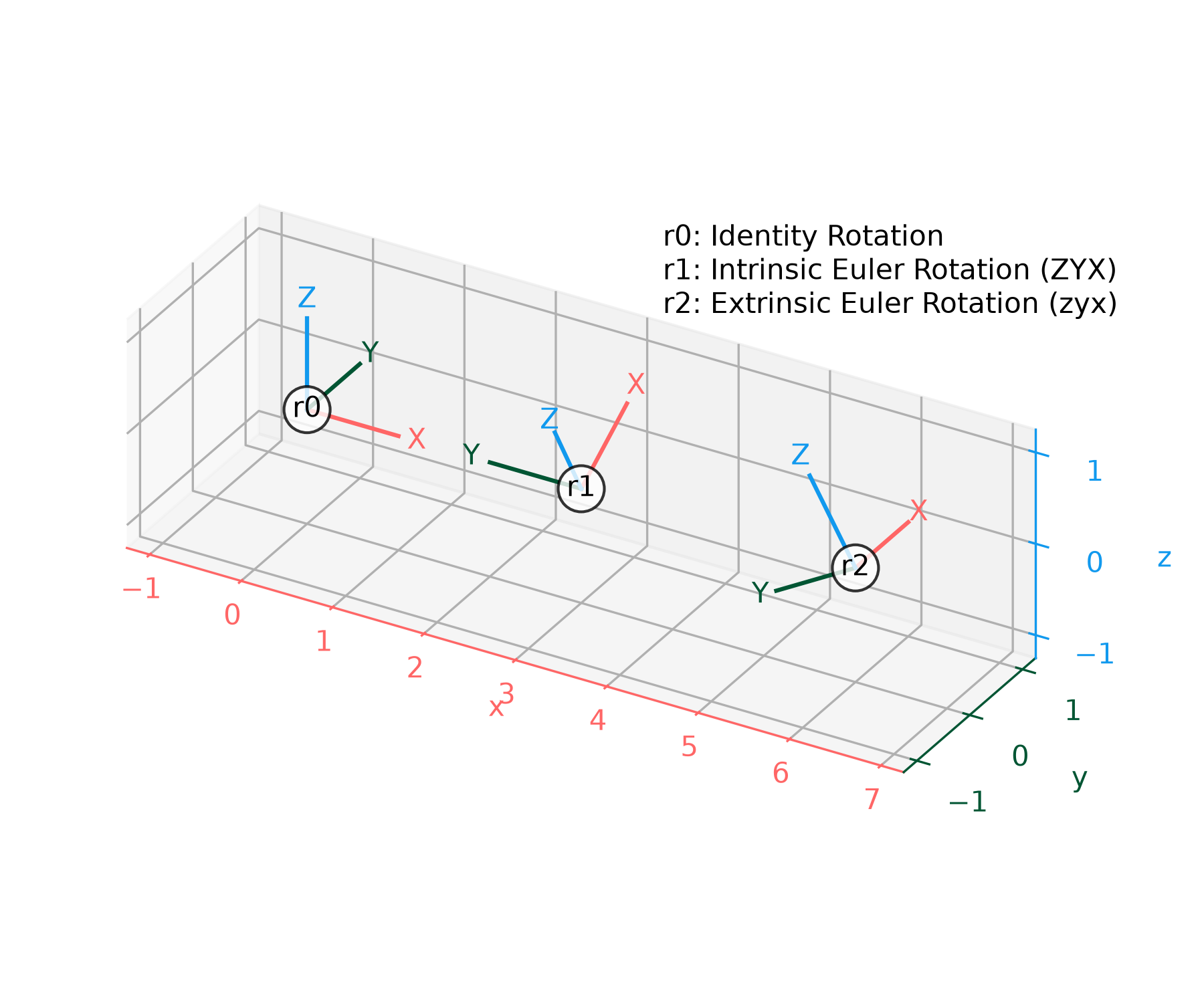
The following function can be used to plot rotations with Matplotlib by
showing how they transform the standard x, y, z coordinate axes:
import matplotlib.pyplot as plt
✓def plot_rotated_axes(ax, r, name=None, offset=(0, 0, 0), scale=1): colors = ("#FF6666", "#005533", "#1199EE") # Colorblind-safe RGB loc = np.array([offset, offset]) for i, (axis, c) in enumerate(zip((ax.xaxis, ax.yaxis, ax.zaxis), colors)): axlabel = axis.axis_name axis.set_label_text(axlabel) axis.label.set_color(c) axis.line.set_color(c) axis.set_tick_params(colors=c) line = np.zeros((2, 3)) line[1, i] = scale line_rot = r.apply(line) line_plot = line_rot + loc ax.plot(line_plot[:, 0], line_plot[:, 1], line_plot[:, 2], c) text_loc = line[1]*1.2 text_loc_rot = r.apply(text_loc) text_plot = text_loc_rot + loc[0] ax.text(*text_plot, axlabel.upper(), color=c, va="center", ha="center") ax.text(*offset, name, color="k", va="center", ha="center", bbox={"fc": "w", "alpha": 0.8, "boxstyle": "circle"})✓
r0 = R.identity()
r1 = R.from_euler("ZYX", [90, -30, 0], degrees=True)  # intrinsic
r2 = R.from_euler("zyx", [90, -30, 0], degrees=True)  # extrinsic
✓
ax = plt.figure().add_subplot(projection="3d", proj_type="ortho")
plot_rotated_axes(ax, r0, name="r0", offset=(0, 0, 0))
plot_rotated_axes(ax, r1, name="r1", offset=(3, 0, 0))
plot_rotated_axes(ax, r2, name="r2", offset=(6, 0, 0))
_ = ax.annotate(
    "r0: Identity Rotation\n"
    "r1: Intrinsic Euler Rotation (ZYX)\n"
    "r2: Extrinsic Euler Rotation (zyx)",
    xy=(0.6, 0.7), xycoords="axes fraction", ha="left"
)
✓
ax.set(xlim=(-1.25, 7.25), ylim=(-1.25, 1.25), zlim=(-1.25, 1.25))
ax.set(xticks=range(-1, 8), yticks=[-1, 0, 1], zticks=[-1, 0, 1])
✗
[[<matplotlib.axis.XTick object at 0x7f3f601de350>, <matplotlib.axis.XTick object at 0x7f3f435c3890>, <matplotlib.axis.XTick object at 0x7f3f435c3250>, <matplotlib.axis.XTick object at 0x7f3f592b5450>, <matplotlib.axis.XTick object at 0x7f3f592b4e10>, <matplotlib.axis.XTick object at 0x7f3f592b4050>, <matplotlib.axis.XTick object at 0x7f3f592b7250>, <matplotlib.axis.XTick object at 0x7f3f592b7c50>, <matplotlib.axis.XTick object at 0x7f3f592b7610>], [<matplotlib.axis.XTick object at 0x7f3f601dc7d0>, <matplotlib.axis.XTick object at 0x7f3f592b4b90>, <matplotlib.axis.XTick object at 0x7f3f592b7110>], [<matplotlib.axis.XTick object at 0x7f3f601df390>, <matplotlib.axis.XTick object at 0x7f3f592b6210>, <matplotlib.axis.XTick object at 0x7f3f592b5bd0>]]
ax.set_aspect("equal", adjustable="box")
ax.figure.set_size_inches(6, 5)
plt.tight_layout()
✓
plt.show()
✓
See also
Aliases
scipy.spatial.transform.Rotation