bundles / scipy 1.17.1 / scipy / signal / _waveforms / chirp
function
scipy.signal._waveforms:chirp
source: /scipy/signal/_waveforms.py:251
Signature
def chirp(t, f0, t1, f1, method = linear, phi = 0, vertex_zero = True, *, complex = False)Summary
Frequency-swept cosine generator.
Extended Summary
In the following, 'Hz' should be interpreted as 'cycles per unit'; there is no requirement here that the unit is one second. The important distinction is that the units of rotation are cycles, not radians. Likewise, t could be a measurement of space instead of time.
Parameters
t: array_likeTimes at which to evaluate the waveform.
f0: floatFrequency (e.g. Hz) at time t=0.
t1: floatTime at which
f1is specified.f1: floatFrequency (e.g. Hz) of the waveform at time
t1.method: {'linear', 'quadratic', 'logarithmic', 'hyperbolic'}, optionalKind of frequency sweep. If not given, linear is assumed. See Notes below for more details.
phi: float, optionalPhase offset, in degrees. Default is 0.
vertex_zero: bool, optionalThis parameter is only used when
methodis 'quadratic'. It determines whether the vertex of the parabola that is the graph of the frequency is at t=0 or t=t1.complex: bool, optionalThis parameter creates a complex-valued analytic signal instead of a real-valued signal. It allows the use of complex baseband (in communications domain). Default is False.
Returns
y: ndarrayA numpy array containing the signal evaluated at
twith the requested time-varying frequency. More precisely, the function returnsexp(1j*phase + 1j*(pi/180)*phi) if complex else cos(phase + (pi/180)*phi)wherephaseis the integral (from 0 tot) of2*pi*f(t). The instantaneous frequencyf(t)is defined below.
Notes
There are four possible options for the parameter method, which have a (long) standard form and some allowed abbreviations. The formulas for the instantaneous frequency of the generated signal are as follows:
Parameter
methodin('linear', 'lin', 'li'):Frequency varies linearly over time with a constant rate .
Parameter
methodin('quadratic', 'quad', 'q'):f(t) = \begin{cases} f_0 + \beta\, t^2 & \text{if vertex_zero is True,}\\ f_1 + \beta\, (t_1 - t)^2 & \text{otherwise,} \end{cases} \quad\text{with}\quad \beta = \frac{f_1 - f_0}{t_1^2}The graph of the frequency f(t) is a parabola through and . By default, the vertex of the parabola is at . If
vertex_zeroisFalse, then the vertex is at . To use a more general quadratic function, or an arbitrary polynomial, use the function scipy.signal.sweep_poly.Parameter
methodin('logarithmic', 'log', 'lo'):and must be nonzero and have the same sign. This signal is also known as a geometric or exponential chirp.
Parameter
methodin('hyperbolic', 'hyp'):and must be nonzero.
Array API Standard Support
chirp has experimental support for Python Array API Standard compatible backends in addition to NumPy. Please consider testing these features by setting an environment variable SCIPY_ARRAY_API=1 and providing CuPy, PyTorch, JAX, or Dask arrays as array arguments. The following combinations of backend and device (or other capability) are supported.
====================  ====================  ====================
Library               CPU                   GPU
====================  ====================  ====================
NumPy                 ✅                     n/a
CuPy                  n/a                   ⛔
PyTorch               ⛔                     ⛔
JAX                   ⛔                     ⛔
Dask                  ⛔                     n/a
====================  ====================  ====================
See
dev-arrayapifor more information.
Examples
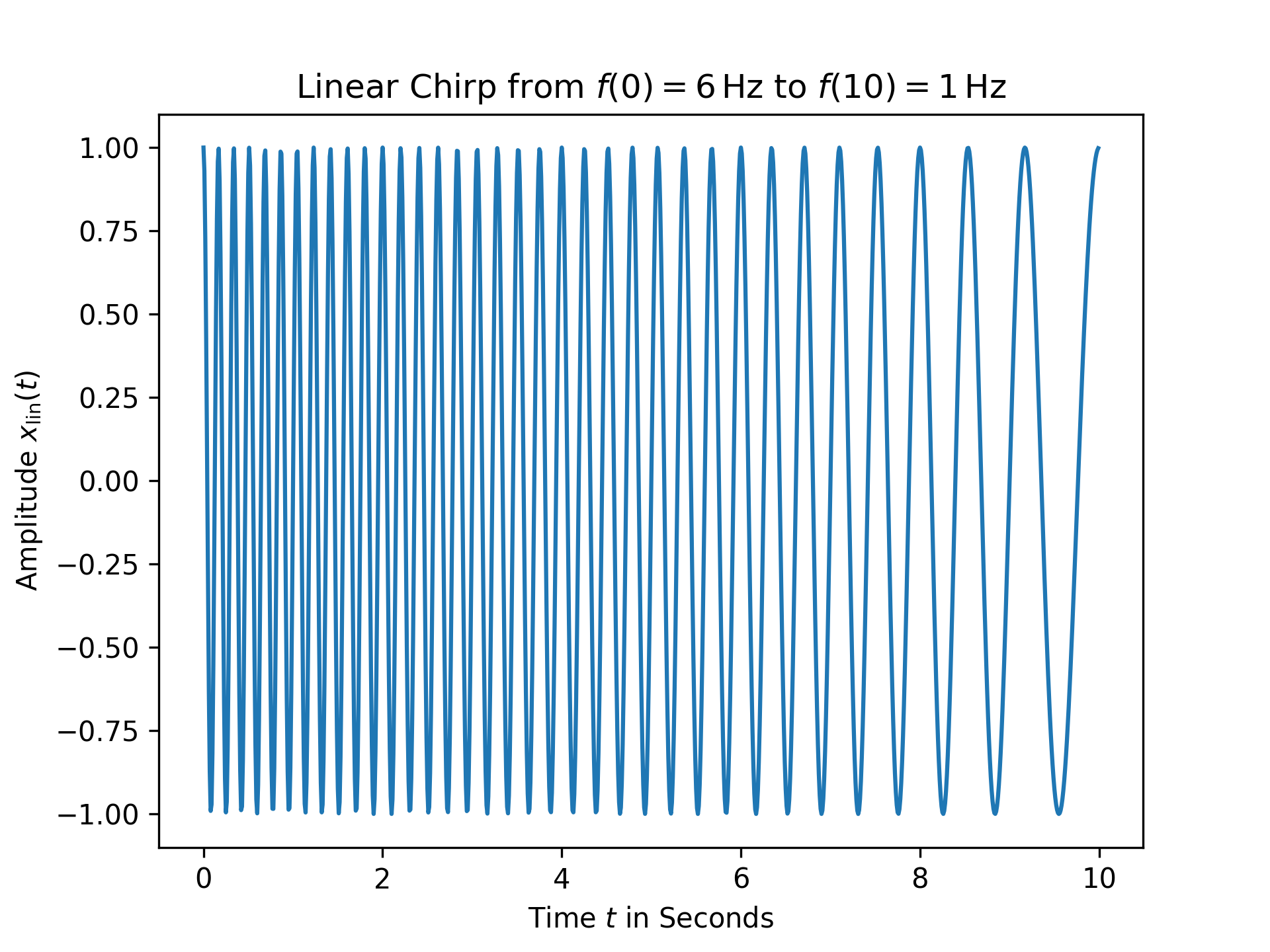
For the first example, a linear chirp ranging from 6 Hz to 1 Hz over 10 seconds is plotted:import numpy as np from matplotlib.pyplot import tight_layout from scipy.signal import chirp, square, ShortTimeFFT from scipy.signal.windows import gaussian import matplotlib.pyplot as plt N, T = 1000, 0.01 # number of samples and sampling interval for 10 s signal t = np.arange(N) * T # timestamps x_lin = chirp(t, f0=6, f1=1, t1=10, method='linear') fg0, ax0 = plt.subplots()✓
ax0.set_title(r"Linear Chirp from $f(0)=6\,$Hz to $f(10)=1\,$Hz")
ax0.set(xlabel="Time $t$ in Seconds", ylabel=r"Amplitude $x_\text{lin}(t)$")
ax0.plot(t, x_lin)
✗
plt.show()
✓
x_qu0 = chirp(t, f0=45, f1=5, t1=N*T, method='quadratic', vertex_zero=True)
x_qu1 = chirp(t, f0=45, f1=5, t1=N*T, method='quadratic', vertex_zero=False)
x_log = chirp(t, f0=45, f1=5, t1=N*T, method='logarithmic')
x_hyp = chirp(t, f0=45, f1=5, t1=N*T, method='hyperbolic')
win = gaussian(50, std=12, sym=True)
SFT = ShortTimeFFT(win, hop=2, fs=1/T, mfft=800, scale_to='magnitude')
ts = ("'quadratic', vertex_zero=True", "'quadratic', vertex_zero=False",
      "'logarithmic'", "'hyperbolic'")
fg1, ax1s = plt.subplots(2, 2, sharex='all', sharey='all',
                         figsize=(6, 5),  layout="constrained")
✓
for x_, ax_, t_ in zip([x_qu0, x_qu1, x_log, x_hyp], ax1s.ravel(), ts):
    aSx = abs(SFT.stft(x_))
    im_ = ax_.imshow(aSx, origin='lower', aspect='auto', extent=SFT.extent(N),
                     cmap='plasma')
    ax_.set_title(t_)
    if t_ == "'hyperbolic'":
        fg1.colorbar(im_, ax=ax1s, label='Magnitude $|S_z(t,f)|$')
✗
_ = fg1.supxlabel("Time $t$ in Seconds")  # `_ =` is needed to pass doctests
_ = fg1.supylabel("Frequency $f$ in Hertz")
plt.show()
✓
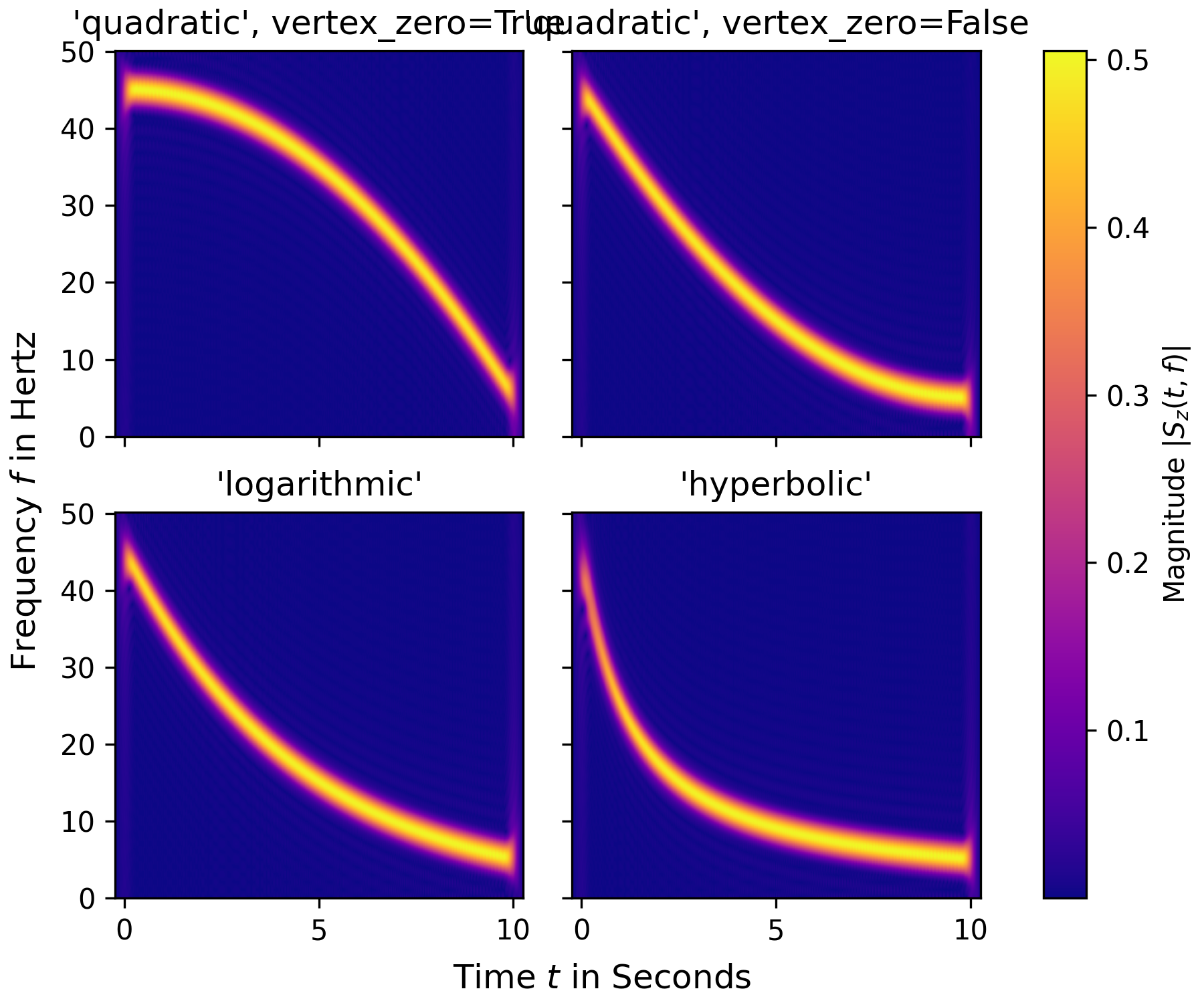
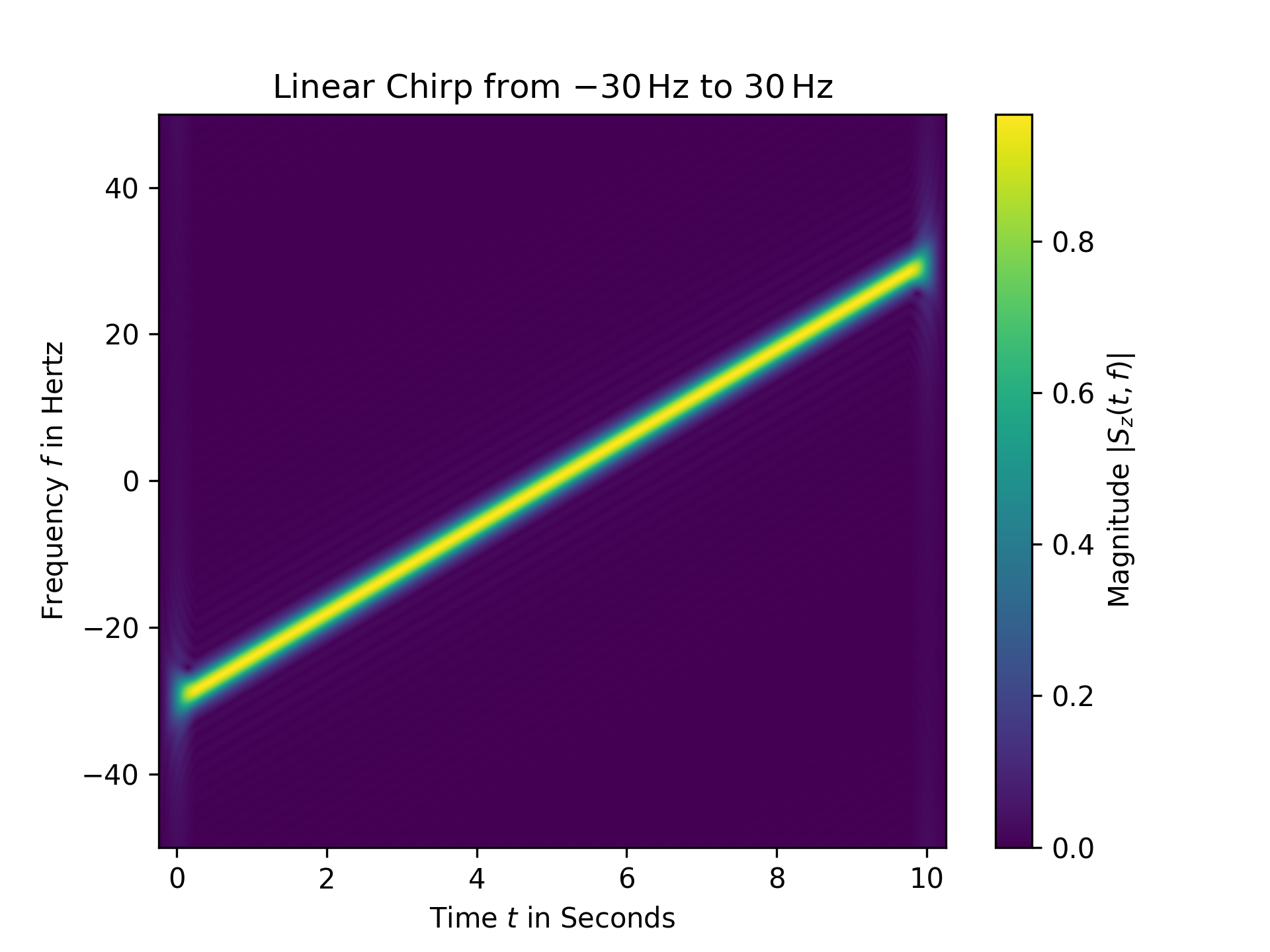
z_lin = chirp(t, f0=-30, f1=30, t1=N*T, method="linear", complex=True)
SFT.fft_mode = 'centered'  # needed to work with complex signals
aSz = abs(SFT.stft(z_lin))
fg2, ax2 = plt.subplots()
✓
ax2.set_title(r"Linear Chirp from $-30\,$Hz to $30\,$Hz")
ax2.set(xlabel="Time $t$ in Seconds", ylabel="Frequency $f$ in Hertz")
✗
im2 = ax2.imshow(aSz, origin='lower', aspect='auto',
                 extent=SFT.extent(N), cmap='viridis')
✓
fg2.colorbar(im2, label='Magnitude $|S_z(t,f)|$')
✗plt.show()
✓
See also
Aliases
scipy.signal.chirp