bundles / scipy latest / scipy / ndimage / _interpolation / affine_transform
function
scipy.ndimage._interpolation:affine_transform
source: build-install/usr/lib/python3.14/site-packages/scipy/ndimage/_interpolation.py:479
Signature
def affine_transform(input, matrix, offset = 0.0, output_shape = None, output = None, order = 3, mode = constant, cval = 0.0, prefilter = True)Summary
Apply an affine transformation.
Extended Summary
Given an output image pixel index vector o, the pixel value is determined from the input image at position np.dot(matrix, o) + offset.
This does 'pull' (or 'backward') resampling, transforming the output space to the input to locate data. Affine transformations are often described in the 'push' (or 'forward') direction, transforming input to output. If you have a matrix for the 'push' transformation, use its inverse (numpy.linalg.inv) in this function.
Parameters
input: array_likeThe input array.
matrix: ndarrayThe inverse coordinate transformation matrix, mapping output coordinates to input coordinates. If
ndimis the number of dimensions ofinput, the given matrix must have one of the following shapes:(ndim, ndim): the linear transformation matrix for each output coordinate.(ndim,): assume that the 2-D transformation matrix is diagonal, with the diagonal specified by the given value. A more efficient algorithm is then used that exploits the separability of the problem.(ndim + 1, ndim + 1): assume that the transformation is specified using homogeneous coordinates [1]. In this case, any value passed tooffsetis ignored.(ndim, ndim + 1): as above, but the bottom row of a homogeneous transformation matrix is always[0, 0, ..., 1], and may be omitted.
offset: float or sequence, optionalThe offset into the array where the transform is applied. If a float,
offsetis the same for each axis. If a sequence,offsetshould contain one value for each axis.output_shape: tuple of ints, optionalShape tuple.
output: array or dtype, optionalThe array in which to place the output, or the dtype of the returned array. By default an array of the same dtype as input will be created.
order: int, optionalThe order of the spline interpolation, default is 3. The order has to be in the range 0-5.
mode: {'reflect', 'grid-mirror', 'constant', 'grid-constant', 'nearest', 'mirror', 'grid-wrap', 'wrap'}, optionalThe
modeparameter determines how the input array is extended beyond its boundaries. Default is 'constant'. Behavior for each valid value is as follows (see additional plots and details on boundary modes):'reflect' (
d c b a | a b c d | d c b a)The input is extended by reflecting about the edge of the last pixel. This mode is also sometimes referred to as half-sample symmetric.
'grid-mirror'
This is a synonym for 'reflect'.
'constant' (
k k k k | a b c d | k k k k)The input is extended by filling all values beyond the edge with the same constant value, defined by the
cvalparameter. No interpolation is performed beyond the edges of the input.'grid-constant' (
k k k k | a b c d | k k k k)The input is extended by filling all values beyond the edge with the same constant value, defined by the
cvalparameter. Interpolation occurs for samples outside the input's extent as well.'nearest' (
a a a a | a b c d | d d d d)The input is extended by replicating the last pixel.
'mirror' (
d c b | a b c d | c b a)The input is extended by reflecting about the center of the last pixel. This mode is also sometimes referred to as whole-sample symmetric.
'grid-wrap' (
a b c d | a b c d | a b c d)The input is extended by wrapping around to the opposite edge.
'wrap' (
b c d b c | a b c d | b c a b c)The input is extended by wrapping around to the opposite edge, but in a way such that the last point and initial point exactly overlap. In this case it is not well defined which sample will be chosen at the point of overlap.
For the example illustrated above, the edge values
aanddoverlap, while the inner patternb crepeats. The example demonstrates one possible output, whileb c a b c | a b c d | b c d b cis another, since eitheraordmay occur at each point of overlap.
cval: scalar, optionalValue to fill past edges of input if
modeis 'constant'. Default is 0.0.prefilter: bool, optionalDetermines if the input array is prefiltered with spline_filter before interpolation. The default is True, which will create a temporary
float64array of filtered values iforder > 1. If setting this to False, the output will be slightly blurred iforder > 1, unless the input is prefiltered, i.e. it is the result of calling spline_filter on the original input.
Returns
affine_transform: ndarrayThe transformed input.
Notes
The given matrix and offset are used to find for each point in the output the corresponding coordinates in the input by an affine transformation. The value of the input at those coordinates is determined by spline interpolation of the requested order. Points outside the boundaries of the input are filled according to the given mode.
For complex-valued input, this function transforms the real and imaginary components independently.
Examples
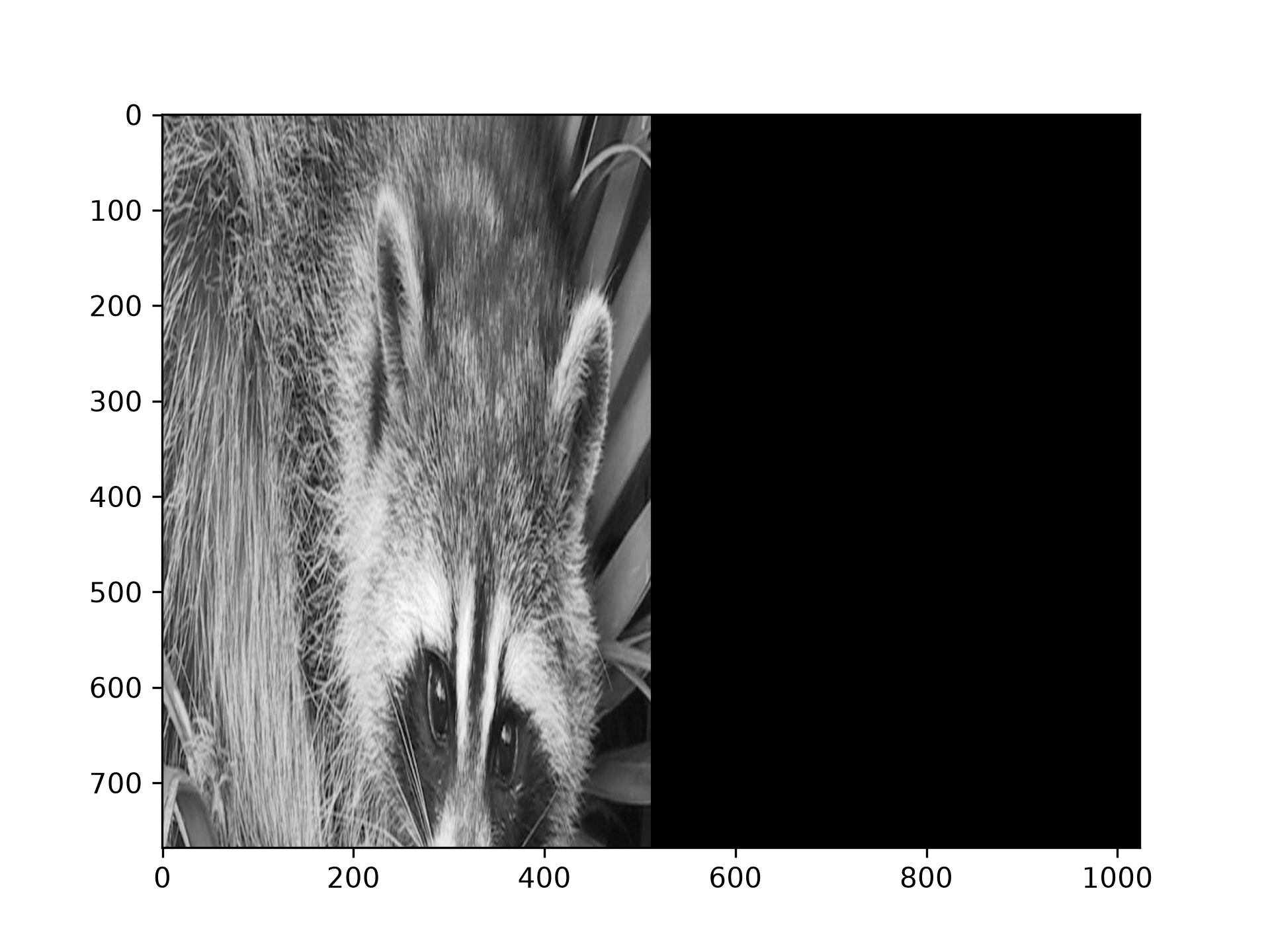
Use `affine_transform` to stretch an image::from scipy.ndimage import affine_transform from scipy.datasets import face from matplotlib import pyplot as plt import numpy as np im = face(gray=True) matrix = (0.5, 2) im2 = affine_transform(im, matrix)✓
plt.imshow(im2)
✗<matplotlib.image.AxesImage object at 0x7f3f601dc7d0>
plt.show()
✓
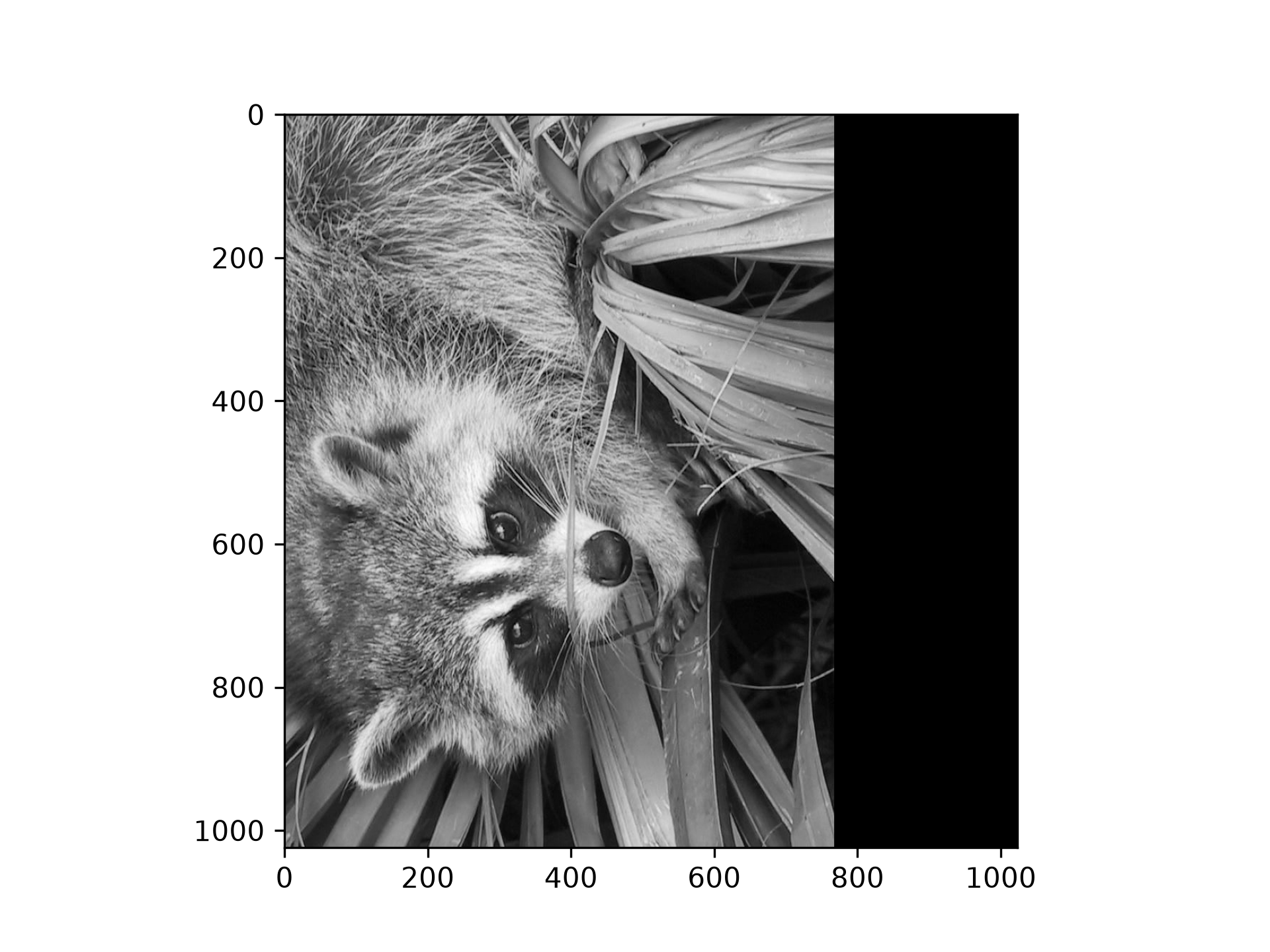
matrix = ((0, 1), (1, 0))
im3 = affine_transform(im, matrix, output_shape=(1024, 1024))
✓
plt.imshow(im3)
✗<matplotlib.image.AxesImage object at 0x7f3f60b4b9d0>
plt.show()
✓
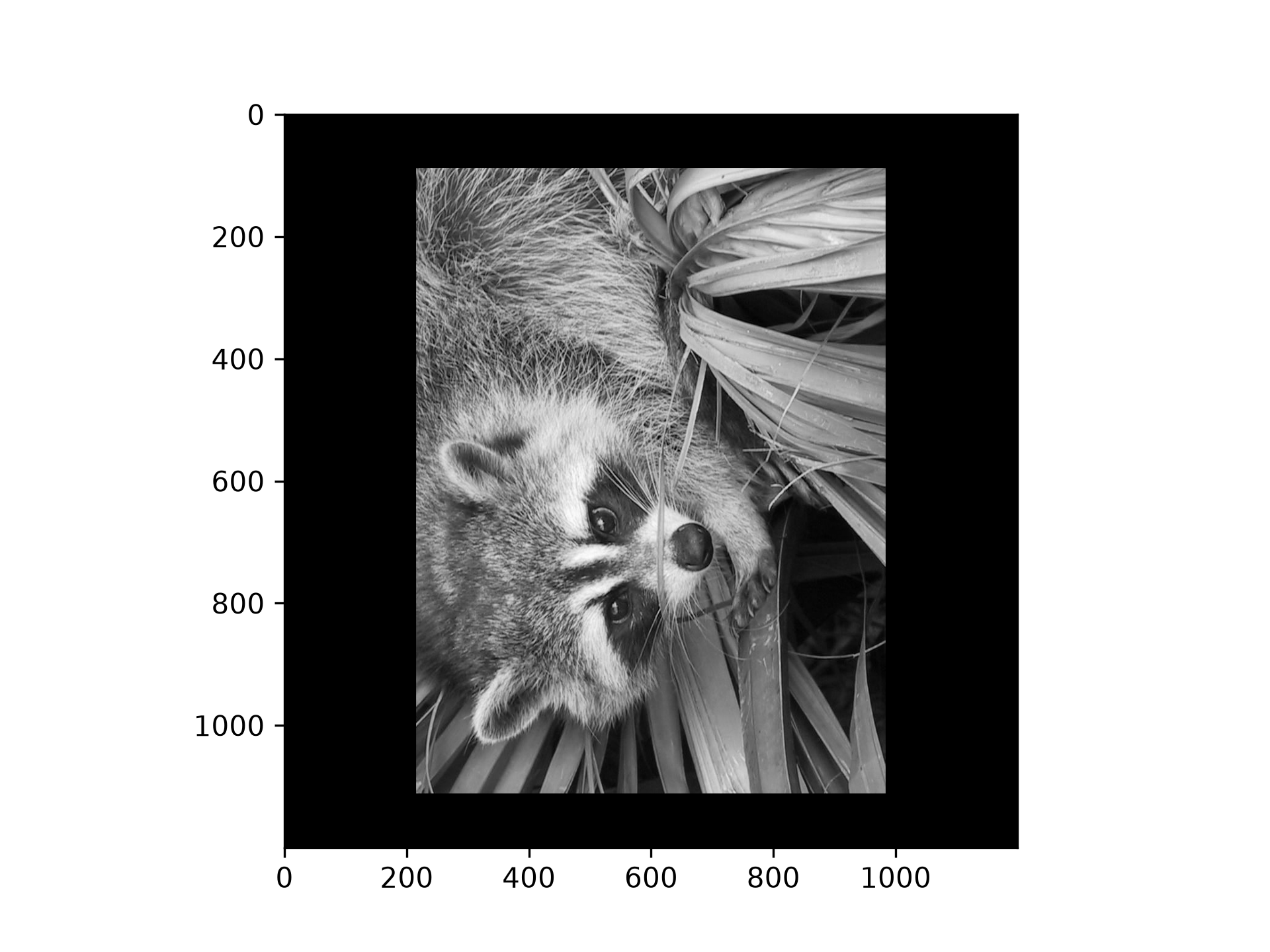
output_shape = (1200, 1200)
offset = (np.array(im.shape) - output_shape) / 2
im4 = affine_transform(im, matrix, offset=offset, output_shape=output_shape)
✓
plt.imshow(im4)
✗<matplotlib.image.AxesImage object at 0x7f3f6834bd90>
plt.show()
✓
Aliases
scipy.ndimage.affine_transform