bundles / scipy latest / scipy / ndimage / _filters / gaussian_filter1d
function
scipy.ndimage._filters:gaussian_filter1d
source: build-install/usr/lib/python3.14/site-packages/scipy/ndimage/_filters.py:697
Signature
def gaussian_filter1d(input, sigma, axis = -1, order = 0, output = None, mode = reflect, cval = 0.0, truncate = 4.0, *, radius = None)Summary
1-D Gaussian filter.
Parameters
input: array_likeThe input array.
sigma: scalarstandard deviation for Gaussian kernel
axis: int, optionalThe axis of
inputalong which to calculate. Default is -1.order: int, optionalAn order of 0 corresponds to convolution with a Gaussian kernel. A positive order corresponds to convolution with that derivative of a Gaussian.
output: array or dtype, optionalThe array in which to place the output, or the dtype of the returned array. By default an array of the same dtype as input will be created.
mode: {'reflect', 'constant', 'nearest', 'mirror', 'wrap'}, optionalThe
modeparameter determines how the input array is extended beyond its boundaries. Default is 'reflect'. Behavior for each valid value is as follows:'reflect' (
d c b a | a b c d | d c b a)The input is extended by reflecting about the edge of the last pixel. This mode is also sometimes referred to as half-sample symmetric.
'constant' (
k k k k | a b c d | k k k k)The input is extended by filling all values beyond the edge with the same constant value, defined by the
cvalparameter.'nearest' (
a a a a | a b c d | d d d d)The input is extended by replicating the last pixel.
'mirror' (
d c b | a b c d | c b a)The input is extended by reflecting about the center of the last pixel. This mode is also sometimes referred to as whole-sample symmetric.
'wrap' (
a b c d | a b c d | a b c d)The input is extended by wrapping around to the opposite edge.
For consistency with the interpolation functions, the following mode names can also be used:
'grid-mirror'
This is a synonym for 'reflect'.
'grid-constant'
This is a synonym for 'constant'.
'grid-wrap'
This is a synonym for 'wrap'.
cval: scalar, optionalValue to fill past edges of input if
modeis 'constant'. Default is 0.0.truncate: float, optionalTruncate the filter at this many standard deviations. Default is 4.0.
radius: None or int, optionalRadius of the Gaussian kernel. If specified, the size of the kernel will be
2*radius + 1, andtruncateis ignored. Default is None.
Returns
gaussian_filter1d: ndarrayReturned array of same shape as
input.
Notes
The Gaussian kernel will have size 2*radius + 1 along each axis. If radius is None, a default radius = round(truncate * sigma) will be used.
Examples
from scipy.ndimage import gaussian_filter1d
import numpy as np
✓
gaussian_filter1d([1.0, 2.0, 3.0, 4.0, 5.0], 1)
gaussian_filter1d([1.0, 2.0, 3.0, 4.0, 5.0], 4)
✗
array([2.919, 2.95 , 3. , 3.05 , 3.081])
import matplotlib.pyplot as plt
rng = np.random.default_rng()
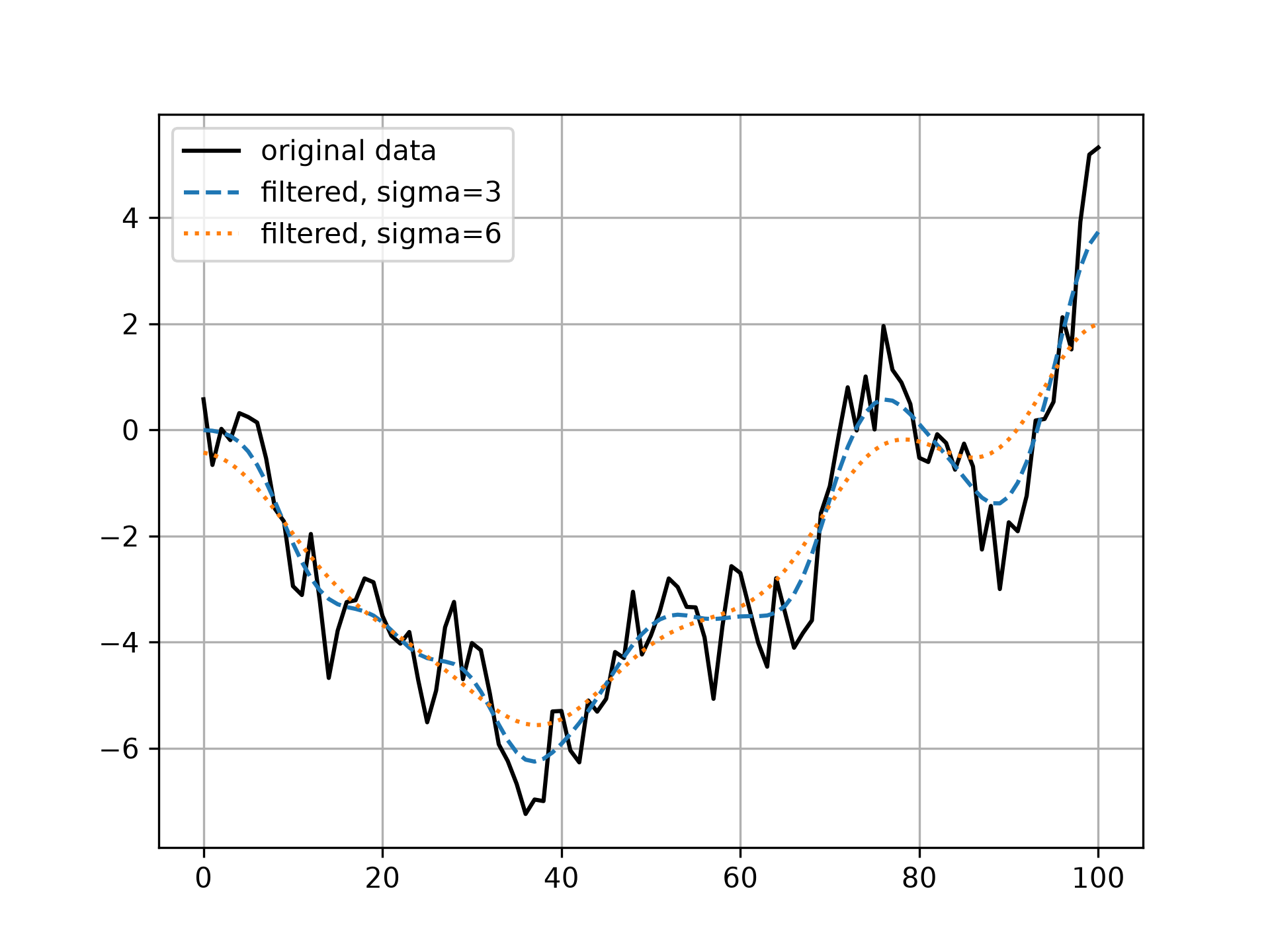
x = rng.standard_normal(101).cumsum()
y3 = gaussian_filter1d(x, 3)
y6 = gaussian_filter1d(x, 6)
✓
plt.plot(x, 'k', label='original data')
plt.plot(y3, '--', label='filtered, sigma=3')
plt.plot(y6, ':', label='filtered, sigma=6')
plt.legend()
✗
<matplotlib.legend.Legend object at 0x7f3f684f6a50>
plt.grid()
plt.show()
✓
Aliases
scipy.ndimage.gaussian_filter1d