bundles / scipy latest / scipy / ndimage / _filters / rank_filter
function
scipy.ndimage._filters:rank_filter
source: build-install/usr/lib/python3.14/site-packages/scipy/ndimage/_filters.py:2041
Signature
def rank_filter(input, rank, size = None, footprint = None, output = None, mode = reflect, cval = 0.0, origin = 0, *, axes = None)Summary
Calculate a multidimensional rank filter.
Parameters
input: array_likeThe input array.
rank: intThe rank parameter may be less than zero, i.e., rank = -1 indicates the largest element.
size: scalar or tuple, optionalSee footprint, below. Ignored if footprint is given.
footprint: array, optionalEither
sizeorfootprintmust be defined.sizegives the shape that is taken from the input array, at every element position, to define the input to the filter function.footprintis a boolean array that specifies (implicitly) a shape, but also which of the elements within this shape will get passed to the filter function. Thussize=(n,m)is equivalent tofootprint=np.ones((n,m)). We adjustsizeto the number of dimensions of the input array, so that, if the input array is shape (10,10,10), andsizeis 2, then the actual size used is (2,2,2). Whenfootprintis given,sizeis ignored.output: array or dtype, optionalThe array in which to place the output, or the dtype of the returned array. By default an array of the same dtype as input will be created.
mode: {'reflect', 'constant', 'nearest', 'mirror', 'wrap'}, optionalThe
modeparameter determines how the input array is extended beyond its boundaries. Default is 'reflect'. Behavior for each valid value is as follows:'reflect' (
d c b a | a b c d | d c b a)The input is extended by reflecting about the edge of the last pixel. This mode is also sometimes referred to as half-sample symmetric.
'constant' (
k k k k | a b c d | k k k k)The input is extended by filling all values beyond the edge with the same constant value, defined by the
cvalparameter.'nearest' (
a a a a | a b c d | d d d d)The input is extended by replicating the last pixel.
'mirror' (
d c b | a b c d | c b a)The input is extended by reflecting about the center of the last pixel. This mode is also sometimes referred to as whole-sample symmetric.
'wrap' (
a b c d | a b c d | a b c d)The input is extended by wrapping around to the opposite edge.
For consistency with the interpolation functions, the following mode names can also be used:
'grid-mirror'
This is a synonym for 'reflect'.
'grid-constant'
This is a synonym for 'constant'.
'grid-wrap'
This is a synonym for 'wrap'.
cval: scalar, optionalValue to fill past edges of input if
modeis 'constant'. Default is 0.0.origin: int or sequence, optionalControls the placement of the filter on the input array's pixels. A value of 0 (the default) centers the filter over the pixel, with positive values shifting the filter to the left, and negative ones to the right. By passing a sequence of origins with length equal to the number of dimensions of the input array, different shifts can be specified along each axis.
axes: tuple of int or None, optionalIf None,
inputis filtered along all axes. Otherwise,inputis filtered along the specified axes. Whenaxesis specified, any tuples used forsize,origin, and/ormodemust match the length ofaxes. The ith entry in any of these tuples corresponds to the ith entry inaxes.
Returns
rank_filter: ndarrayFiltered array. Has the same shape as
input.
Examples
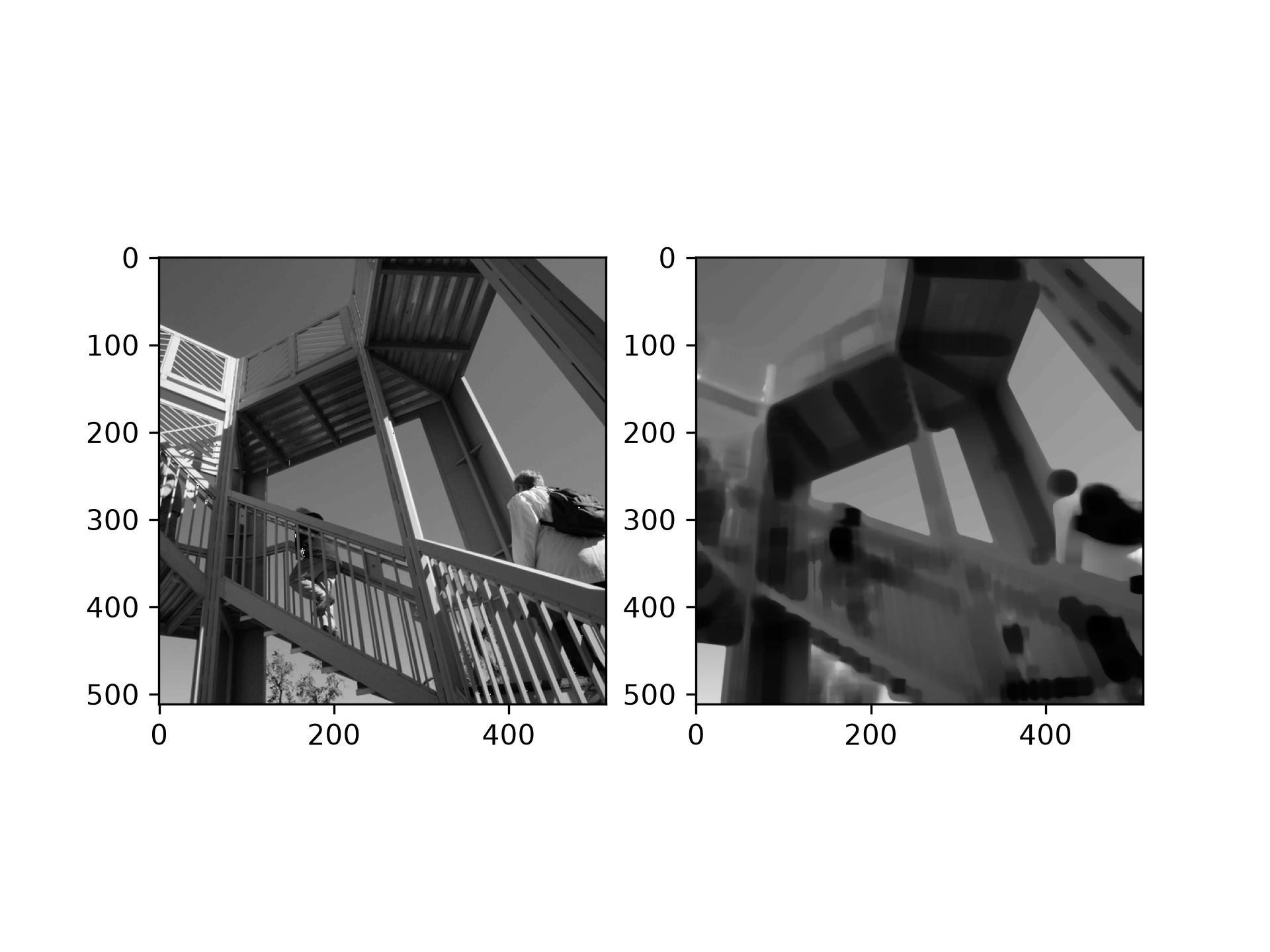
from scipy import ndimage, datasets
import matplotlib.pyplot as plt
fig = plt.figure()
plt.gray()  # show the filtered result in grayscale
ax1 = fig.add_subplot(121)  # left side
ax2 = fig.add_subplot(122)  # right side
ascent = datasets.ascent()
result = ndimage.rank_filter(ascent, rank=42, size=20)
✓
ax1.imshow(ascent)
ax2.imshow(result)
✗
<matplotlib.image.AxesImage object at 0x7f3f60ce6710>
plt.show()
✓
Aliases
scipy.ndimage.rank_filter