bundles / scipy latest / scipy / signal / _short_time_fft / ShortTimeFFT / extent
function
scipy.signal._short_time_fft:ShortTimeFFT.extent
source: build-install/usr/lib/python3.14/site-packages/scipy/signal/_short_time_fft.py:2207
Signature
def extent(self, n: int, axes_seq: Literal['tf', 'ft'] = tf, center_bins: bool = False) → tuple[float, float, float, float]Summary
Return minimum and maximum time-frequency values.
Parameters
n: intNumber of samples in input signal.
axes_seq: {'tf', 'ft'}Return time extent first and then frequency extent or vice versa.
center_bins: boolIf set (default
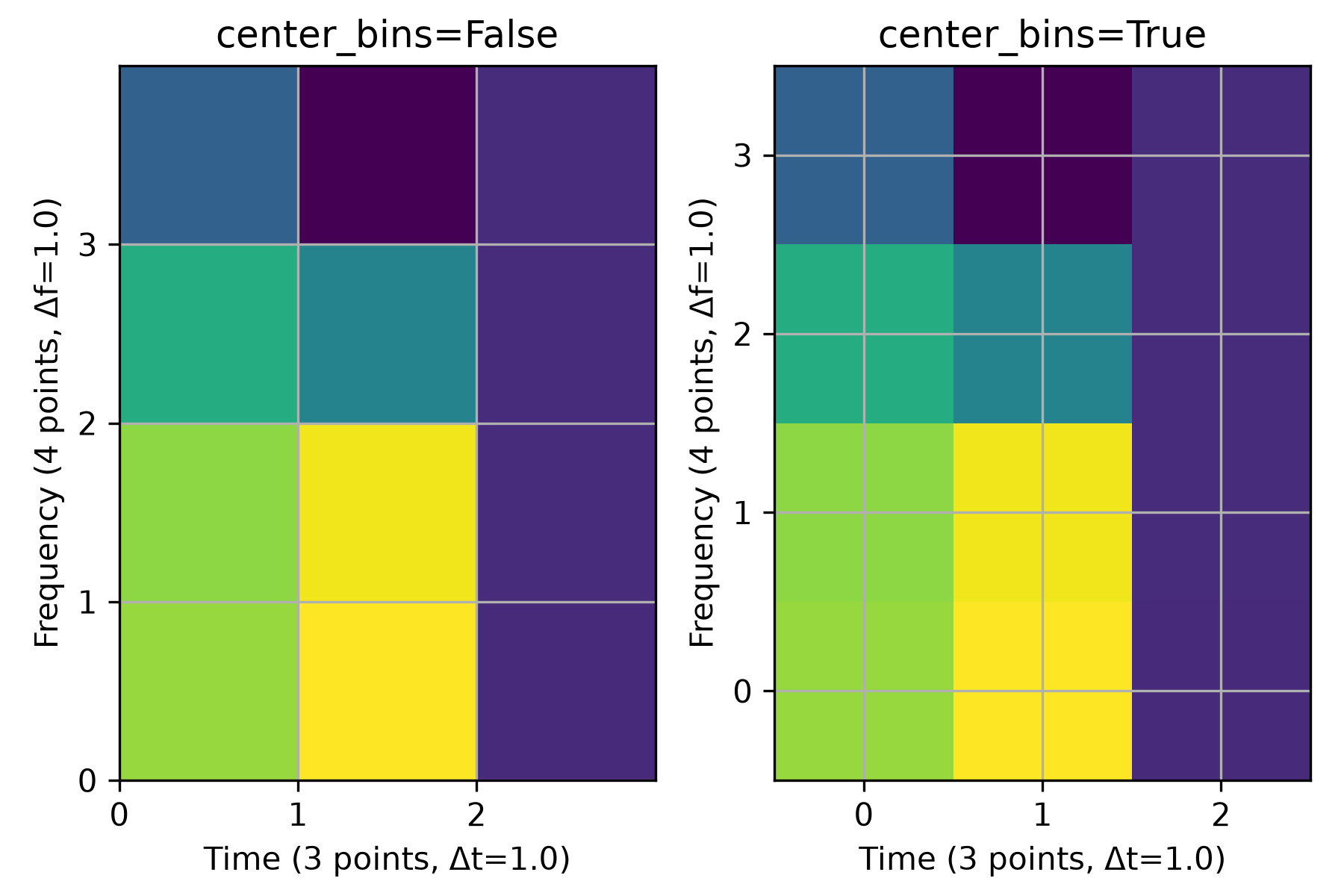
False), the values of the time slots and frequency bins are moved from the side to the middle. This is useful, when plotting the stft values as step functions, i.e., with no interpolation.
Returns
: tupleA tuple with four floats
(t0, t1, f0, f1)for 'tf' and(f0, f1, t0, t1)for 'ft' is returned describing the corners of the time-frequency domain of the stft. That tuple can be passed to matplotlib.pyplot.imshow as a parameter with the same name.
Examples
The following two plots illustrate the effect of the parameter `center_bins`: The grid lines represent the three time and the four frequency values of the STFT. The left plot, where ``(t0, t1, f0, f1) = (0, 3, 0, 4)`` is passed as parameter ``extent`` to `~matplotlib.pyplot.imshow`, shows the standard behavior of the time and frequency values being at the lower edge of the corresponding bin. The right plot, with ``(t0, t1, f0, f1) = (-0.5, 2.5, -0.5, 3.5)``, shows that the bins are centered over the respective values when passing ``center_bins=True``.import matplotlib.pyplot as plt import numpy as np from scipy.signal import ShortTimeFFT n, m = 12, 6 SFT = ShortTimeFFT.from_window('hann', fs=m, nperseg=m, noverlap=0) Sxx = SFT.stft(np.cos(np.arange(n))) # produces a colorful plot fig, axx = plt.subplots(1, 2, tight_layout=True, figsize=(6., 4.))✓
for ax_, center_bins in zip(axx, (False, True)):
    ax_.imshow(abs(Sxx), origin='lower', interpolation=None, aspect='equal',
               cmap='viridis', extent=SFT.extent(n, 'tf', center_bins))
    ax_.set_title(f"{center_bins=}")
    ax_.set_xlabel(f"Time ({SFT.p_num(n)} points, Δt={SFT.delta_t})")
    ax_.set_ylabel(f"Frequency ({SFT.f_pts} points, Δf={SFT.delta_f})")
    ax_.set_xticks(SFT.t(n))  # vertical grid line are timestamps
    ax_.set_yticks(SFT.f)  # horizontal grid line are frequency values
    ax_.grid(True)
✗
<matplotlib.image.AxesImage object at 0x7f3f43e74f50>
Text(0.5, 1.0, 'center_bins=False')
Text(0.5, 0, 'Time (3 points, Δt=1.0)')
Text(0, 0.5, 'Frequency (4 points, Δf=1.0)')
[<matplotlib.axis.XTick object at 0x7f3f43cf6fd0>, <matplotlib.axis.XTick object at 0x7f3f43cd1310>, <matplotlib.axis.XTick object at 0x7f3f43cd1590>]
[<matplotlib.axis.YTick object at 0x7f3f43cf7390>, <matplotlib.axis.YTick object at 0x7f3f43cd0a50>, <matplotlib.axis.YTick object at 0x7f3f43cd0e10>, <matplotlib.axis.YTick object at 0x7f3f43cd1bd0>]
<matplotlib.image.AxesImage object at 0x7f3f43cd16d0>
Text(0.5, 1.0, 'center_bins=True')
Text(0.5, 0, 'Time (3 points, Δt=1.0)')
Text(0, 0.5, 'Frequency (4 points, Δf=1.0)')
[<matplotlib.axis.XTick object at 0x7f3f43be8e10>, <matplotlib.axis.XTick object at 0x7f3f43cd1450>, <matplotlib.axis.XTick object at 0x7f3f43cd0050>]
[<matplotlib.axis.YTick object at 0x7f3f43be91d0>, <matplotlib.axis.YTick object at 0x7f3f43cd2490>, <matplotlib.axis.YTick object at 0x7f3f43cd2850>, <matplotlib.axis.YTick object at 0x7f3f43cd2c10>]
plt.show()
✓
See also
- matplotlib.pyplot.imshow
Display data as an image.
- scipy.signal.ShortTimeFFT
Class this method belongs to.
Aliases
scipy.signal.ShortTimeFFT.extent