bundles / scipy latest / scipy / signal / _short_time_fft / ShortTimeFFT / spectrogram
function
scipy.signal._short_time_fft:ShortTimeFFT.spectrogram
source: build-install/usr/lib/python3.14/site-packages/scipy/signal/_short_time_fft.py:1261
Signature
def spectrogram(self, x: np.ndarray, y: np.ndarray | None = None, detr: Callable[[np.ndarray], np.ndarray] | Literal['linear', 'constant'] | None = None, *, p0: int | None = None, p1: int | None = None, k_offset: int = 0, padding: PAD_TYPE = zeros, axis: int = -1) → np.ndarraySummary
Calculate spectrogram or cross-spectrogram.
Extended Summary
The spectrogram is the absolute square of the STFT, i.e., it is abs(S[q,p])**2 for given S[q,p] and thus is always non-negative. For two STFTs Sx[q,p], Sy[q,p], the cross-spectrogram is defined as Sx[q,p] * np.conj(Sy[q,p]) and is complex-valued. This is a convenience function for calling stft / stft_detrend, hence all parameters are discussed there.
Parameters
x: np.ndarrayThe input signal as real or complex valued array. For complex values, the property
fft_modemust be set to 'twosided' or 'centered'.y: np.ndarrayThe second input signal of the same shape as
x. IfNone, it is assumed to bex. For complex values, the propertyfft_modemust be set to 'twosided' or 'centered'.detr: 'linear' | 'constant' | Callable[[np.ndarray], np.ndarray] | NoneIf 'constant', the mean is subtracted, if set to "linear", the linear trend is removed from each segment. This is achieved by calling detrend. If
detris a function with one parameter,detris applied to each segment. ForNone(default), no trends are removed.p0: int | NoneThe first element of the range of slices to calculate. If
Nonethen it is set top_min, which is the smallest possible slice.p1: int | NoneThe end of the array. If
Nonethenp_max(n)is used.k_offset: intIndex of first sample (t = 0) in
x.padding: 'zeros' | 'edge' | 'even' | 'odd'Kind of values which are added, when the sliding window sticks out on either the lower or upper end of the input
x. Zeros are added if the default 'zeros' is set. For 'edge' either the first or the last value ofxis used. 'even' pads by reflecting the signal on the first or last sample and 'odd' additionally multiplies it with -1.axis: intThe axis of
xover which to compute the STFT. If not given, the last axis is used.
Returns
S_xy: np.ndarrayA real-valued array with non-negative values is returned, if
x is yoryisNone. The dimension is always by one larger than ofx. The last axis always represents the time slices of the spectrogram.axisdefines the frequency axis (default second to last). E.g., for a one-dimensionalx, a complex 2d array is returned, with axis 0 representing frequency and axis 1 the time slices.
Notes
The cross-spectrogram may be interpreted as the time-frequency analogon of the cross-spectral density (consult csd). The absolute square |Sxy|² of a cross-spectrogram Sxy divided by the spectrograms Sxx and Syy can be interpreted as a coherence spectrogram Cxy := abs(Sxy)**2 / (Sxx*Syy), which is the time-frequency analogon to coherence.
If the STFT is parametrized to be a unitary transform, i.e., utilizing from_win_equals_dual, then the value of the scalar product, hence also the energy, is preserved.
Examples
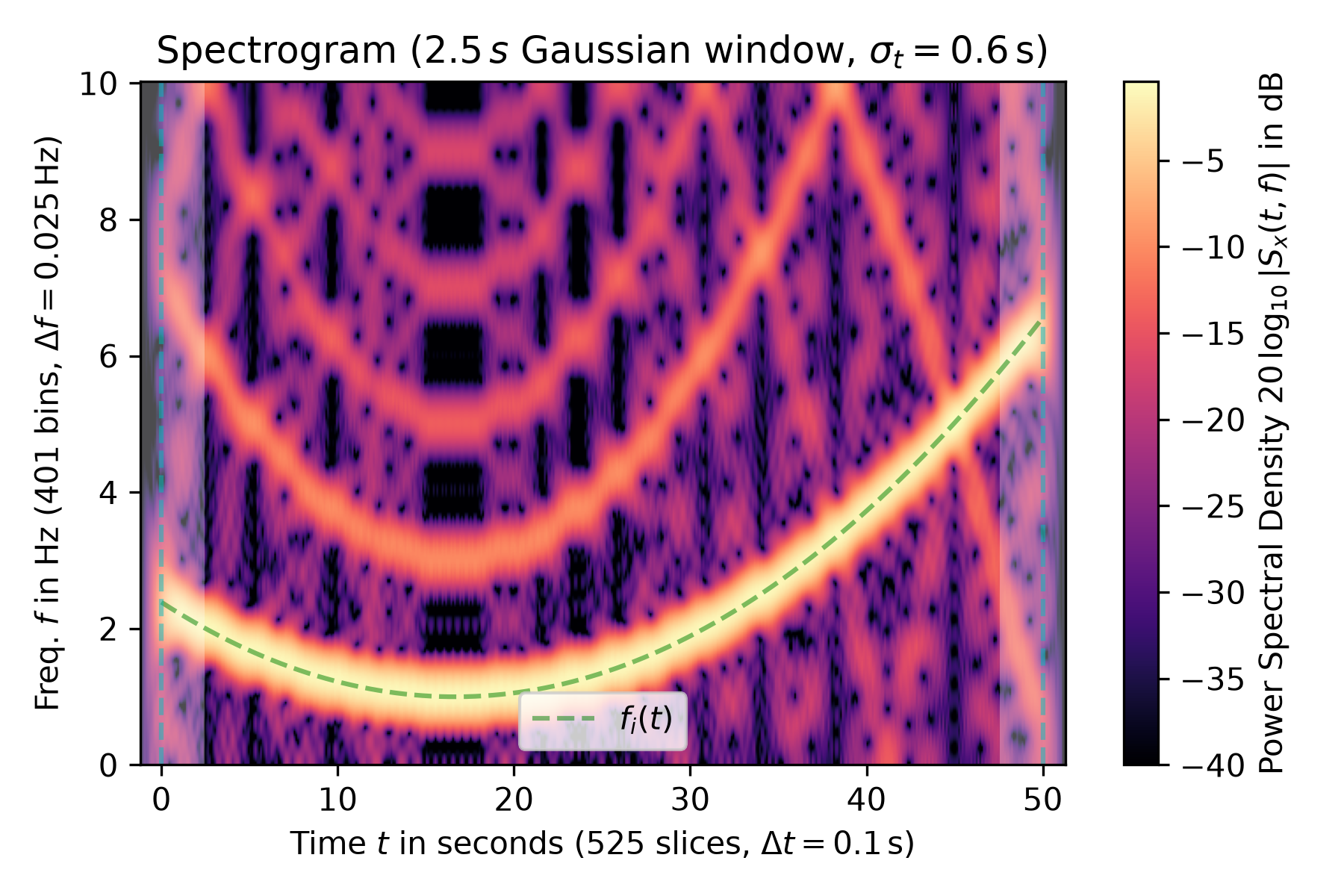
The following example shows the spectrogram of a square wave with varying frequency :math:`f_i(t)` (marked by a green dashed line in the plot) sampled with 20 Hz. The utilized Gaussian window is 50 samples or 2.5 s long. For the `ShortTimeFFT`, the parameter ``mfft=800`` (oversampling factor 16) and the `hop` interval of 2 in was chosen to produce a sufficient number of points. The plot's colormap is logarithmically scaled as the power spectral density is in dB. The time extent of the signal `x` is marked by vertical dashed lines, and the shaded areas mark the presence of border effects.import matplotlib.pyplot as plt import numpy as np from scipy.signal import square, ShortTimeFFT from scipy.signal.windows import gaussian T_x, N = 1 / 20, 1000 # 20 Hz sampling rate for 50 s signal t_x = np.arange(N) * T_x # time indexes for signal f_i = 5e-3*(t_x - t_x[N // 3])**2 + 1 # varying frequency x = square(2*np.pi*np.cumsum(f_i)*T_x) # the signal g_std = 12 # standard deviation for Gaussian window in samples win = gaussian(50, std=g_std, sym=True) # symmetric Gaussian wind. SFT = ShortTimeFFT(win, hop=2, fs=1/T_x, mfft=800, scale_to='psd') Sx2 = SFT.spectrogram(x) # calculate absolute square of STFT fig1, ax1 = plt.subplots(figsize=(6., 4.)) # enlarge plot a bit t_lo, t_hi = SFT.extent(N)[:2] # time range of plot✓
ax1.set_title(rf"Spectrogram ({SFT.m_num*SFT.T:g}$\,s$ Gaussian " +
              rf"window, $\sigma_t={g_std*SFT.T:g}\,$s)")
ax1.set(xlabel=f"Time $t$ in seconds ({SFT.p_num(N)} slices, " +
               rf"$\Delta t = {SFT.delta_t:g}\,$s)",
        ylabel=f"Freq. $f$ in Hz ({SFT.f_pts} bins, " +
               rf"$\Delta f = {SFT.delta_f:g}\,$Hz)",
        xlim=(t_lo, t_hi))
✗
[Text(0.5, 0, 'Time $t$ in seconds (525 slices, $\\Delta t = 0.1\\,$s)'), Text(0, 0.5, 'Freq. $f$ in Hz (401 bins, $\\Delta f = 0.025\\,$Hz)'), (-1.2000000000000002, 51.300000000000004)]
Sx_dB = 10 * np.log10(np.fmax(Sx2, 1e-4))  # limit range to -40 dB
im1 = ax1.imshow(Sx_dB, origin='lower', aspect='auto',
                 extent=SFT.extent(N), cmap='magma')
✓
ax1.plot(t_x, f_i, 'g--', alpha=.5, label='$f_i(t)$')
fig1.colorbar(im1, label='Power Spectral Density ' +
                         r"$20\,\log_{10}|S_x(t, f)|$ in dB")
for t0_, t1_ in [(t_lo, SFT.lower_border_end[0] * SFT.T),
                 (SFT.upper_border_begin(N)[0] * SFT.T, t_hi)]:
    ax1.axvspan(t0_, t1_, color='w', linewidth=0, alpha=.3)
for t_ in [0, N * SFT.T]:  # mark signal borders with vertical line
    ax1.axvline(t_, color='c', linestyle='--', alpha=0.5)
ax1.legend()
✗
<matplotlib.legend.Legend object at 0x7f3f43e57620>
fig1.tight_layout()
plt.show()
✓
See also
- scipy.signal.ShortTimeFFT
Class this method belongs to.
- stft_detrend
STFT with a trend subtracted from each segment.
- ~ShortTimeFFT.stft
Perform the short-time Fourier transform.
Aliases
scipy.signal.ShortTimeFFT.spectrogram