bundles / scipy 2.0.0.dev0+git20260907.41eeb59 / scipy / signal / windows / _windows / boxcar
function
scipy.signal.windows._windows:boxcar
source: build-install/usr/lib/python3.14/site-packages/scipy/signal/windows/_windows.py:151
Signature
def boxcar(M, sym = True, *, xp = None, device = None)Summary
Return a boxcar or rectangular window.
Extended Summary
Also known as a rectangular window or Dirichlet window. This is equivalent to no window at all.
Parameters
M: intNumber of points in the output window. If zero, an empty array is returned. An exception is thrown when it is negative.
sym: bool, optionalWhether the window is symmetric. (Has no effect for boxcar.)
xp: array_namespace, optionalOptional array namespace. Should be compatible with the array API standard, or supported by array-api-compat. Default:
numpydevice: anyoptional device specification for output. Should match one of the supported device specification in
xp.
Returns
w: ndarrayThe window, i.e.,
w = np.ones(M).
Notes
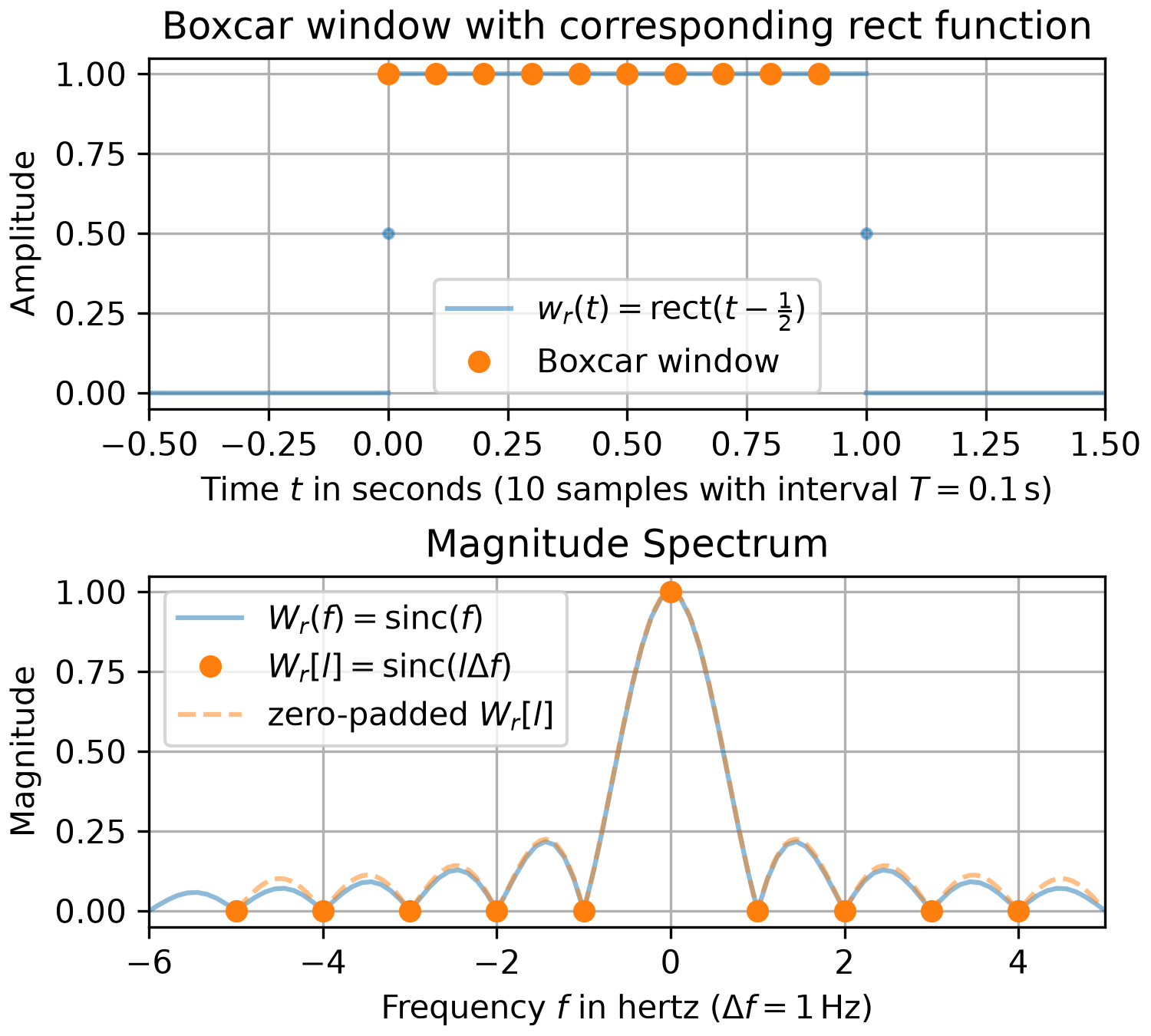
Note that this function differs from the continuous-time "rect" function [1] by not returning 1/2 at its borders.
The Fourier transform of a continuous-time boxcar window can be expressed as
with being the window width and the sampling interval. Eq. eq_FFT_SamplingFourierTrafo in the tutorial_FFT_DFT section of the user_guide can be used to determine the values of the discrete Fourier transform (aka FFT), i.e.,
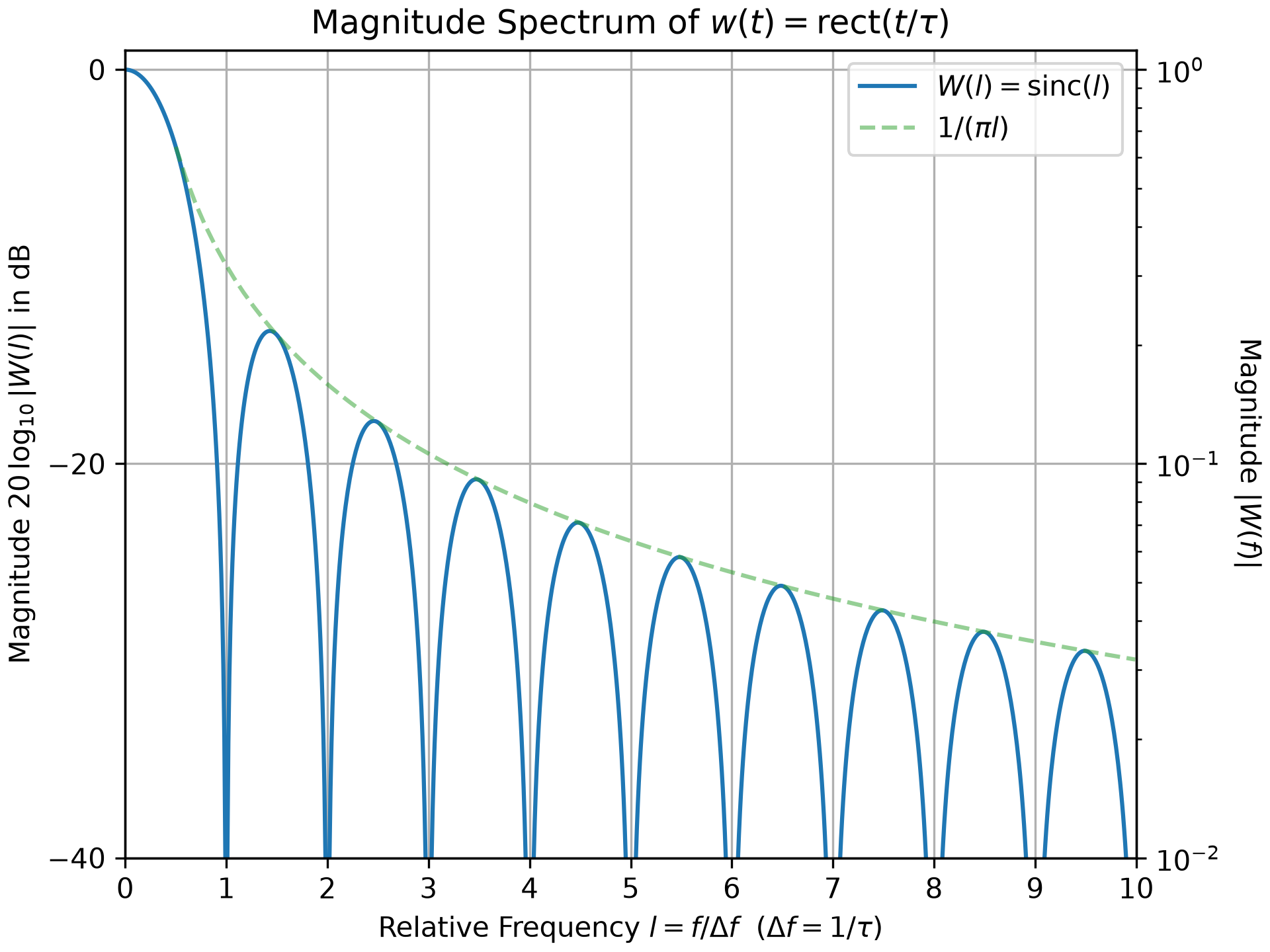
Here, is the FFT normalization constant (default: ). is zero for nonzero integer values of and its sidelobes decrease on the order of .
For many applications, like calculating a magnitude spectrum in the example below, a normalized window is needed. Consult the tutorial_SpectralAnalysis section of the user_guide for details.
Examples
The following example compares a 10-sample boxcar window to its corresponding rect function. The upper plot depicts the amplitudes, whereas the corresponding magnitude spectra are shown in the lower plot. A standard resolution spectrum and a high resolution one, which is zero-padded by factor 16, are shown of the boxcar window. That the boxcar spectrum does not coincide everywhere with the rect function spectrum is due to the underlying continuous-time function of the boxcar window being a 10-term Fourier series approximation of the rect function.import numpy as np from matplotlib import pyplot as plt from scipy.fft import fft, fftfreq, fftshift from scipy.signal.windows import boxcar N, T = 10, 1/10 # number of samples and sampling interval in seconds t_w = np.arange(N) * T # sample times w = boxcar(N) # boxcar window W = fft(w) / sum(w) # amplitude spectrum of w f_W = fftfreq(N, T) # frequencies of W in Hz W16 = fftshift(fft(w, n=16*N)) / sum(w) # zero-padded amplitude spectrum f_W16 = fftshift(fftfreq(N*16, T)) # frequencies of W16 in Hz f_R = np.linspace(-((N + 2) // 2), (N + 1) // 2, 100, endpoint=True) R = np.sinc(f_R) _, (ax0, ax1) = plt.subplots(2, 1, figsize=(5, 4.5), constrained_layout=True)✓
ax0.set_title(r"Boxcar window with corresponding rect function")
ax0.set(ylabel="Amplitude", xlim=(-0.5, 1.5),
        xlabel=rf"Time $t$ in seconds (${N}$ samples with interval ${T=}\,$s)")
ax0.plot([[-.5,  0,  1], [ 0,  1, 1.5]], [[0, 1, 0], [0, 1, 0]], 'C0-',
         alpha=0.5, label=(r"$w_r(t) = $rect$(t-\frac{1}{2})$", None, None))
ax0.plot([[0, 1]], [[0.5, 0.5]], 'C0.-', alpha=0.5)  # mark border values of 1/2
ax0.plot(t_w, w, 'C1o', label="Boxcar window")
ax1.set_title(r"Magnitude Spectrum")
ax1.set(ylabel="Magnitude", xlim=(f_R[0], f_R[-1]),
        xlabel=rf"Frequency $f$ in hertz ($\Delta f = {f_W[1]:g}\,$Hz)")
ax1.plot(f_R, abs(R), 'C0-', alpha=0.5, label="$W_r(f) = $sinc$(f)$")
ax1.plot(f_W, abs(W), 'C1o', label=r"$W_r[l] = $sinc$(l\Delta f)$")
ax1.plot(f_W16, abs(W16), 'C1--', alpha=0.5, label="zero-padded $W_r[l]$")
for ax_, l_ in zip((ax0, ax1), ('lower center', 'best')):
    ax_.legend(loc=l_)
    ax_.grid(True)
✗
<matplotlib.legend.Legend object at 0x7f3f5870c2f0>
<matplotlib.legend.Legend object at 0x7f3f5870cc20>
plt.show()
✓
import numpy as np
from matplotlib import pyplot as plt
f = np.arange(0, 10, 0.01)
W_abs = abs(np.sinc(f))
W_dB = np.where(W_abs > 0, 20*np.log10(W_abs), -1e250)
f_Y = np.linspace(.5, f[-1], 100)
Y_dB = 20*np.log10(1 / (np.pi*f_Y))
_, ax0 = plt.subplots(constrained_layout=True)
✓
ax0.set_title(r"Magnitude Spectrum of $w(t) = $rect$(t/\tau)$")
ax0.set(ylabel=r"Magnitude $20\,\log_{10} |W(l)|$ in dB", ylim=(-40, 1),
        xlabel=r"Relative Frequency $l=f/\Delta f\ $ ($\Delta f = 1/\tau$)",
        xlim=(f[0], f[-1]), yticks=[-40, -20, 0], xticks=np.arange(11))
ax0.plot(f, W_dB, label="$W(l) = $sinc$(l)$")
ax0.plot(f_Y, Y_dB, 'C2--', alpha=0.5, label=r"$1 / (\pi l)$")
ax0.legend()
✗
<matplotlib.legend.Legend object at 0x7f3f5828ae40>
ax0.grid(True)
ax1 = ax0.twinx() # create right y-axis with logarithmic scaling:
✓
ax1.set_ylabel("Magnitude $|W(f)|$", rotation=-90, labelpad=15)
ax1.set(ylim=(1e-2, 10**(1/20)), yscale="log")
✗
[(0.01, 1.1220184543019633), None]
plt.show()
✓
Aliases
scipy.signal.windows.boxcar