bundles / scipy 2.0.0.dev0+git20260907.41eeb59 / scipy / signal / windows / _windows / dpss
function
scipy.signal.windows._windows:dpss
source: build-install/usr/lib/python3.14/site-packages/scipy/signal/windows/_windows.py:2138
Signature
def dpss(M, NW, Kmax = None, sym = True, norm = None, return_ratios = False, *, xp = None, device = None)Summary
Compute the Discrete Prolate Spheroidal Sequences (DPSS).
Extended Summary
DPSS (or Slepian sequences) are often used in multitaper power spectral density estimation (see [1]). The first window in the sequence can be used to maximize the energy concentration in the main lobe, and is also called the Slepian window.
Parameters
M: intWindow length.
NW: floatStandardized half bandwidth corresponding to
2*NW = BW/f0 = BW*M*dtwheredtis taken as 1.Kmax: int | None, optionalNumber of DPSS windows to return (orders
0throughKmax-1). If None (default), return only a single window of shape(M,)instead of an array of windows of shape(Kmax, M).sym: bool, optionalWhen True (default), generates a symmetric window, for use in filter design. When False, generates a periodic window, for use in spectral analysis.
norm: {2, 'approximate', 'subsample'} | None, optionalIf 'approximate' or 'subsample', then the windows are normalized by the maximum, and a correction scale-factor for even-length windows is applied either using
M**2/(M**2+NW)("approximate") or a FFT-based subsample shift ("subsample"), see Notes for details. If None, then "approximate" is used whenKmax=Noneand 2 otherwise (which uses the l2 norm).return_ratios: bool, optionalIf True, also return the concentration ratios in addition to the windows.
xp: array_namespace, optionalOptional array namespace. Should be compatible with the array API standard, or supported by array-api-compat. Default:
numpydevice: anyoptional device specification for output. Should match one of the supported device specification in
xp.
Returns
v: ndarray, shape (Kmax, M) or (M,)The DPSS windows. Will be 1D if
Kmaxis None.r: ndarray, shape (Kmax,) or float, optionalThe concentration ratios for the windows. Only returned if
return_ratiosevaluates to True. Will be 0D ifKmaxis None.
Notes
This computation uses the tridiagonal eigenvector formulation given in [2].
The default normalization for Kmax=None, i.e. window-generation mode, simply using the l-infinity norm would create a window with two unity values, which creates slight normalization differences between even and odd orders. The approximate correction of M**2/float(M**2+NW) for even sample numbers is used to counteract this effect (see Examples below).
For very long signals (e.g., 1e6 elements), it can be useful to compute windows orders of magnitude shorter and use interpolation (e.g., scipy.interpolate.interp1d) to obtain tapers of length M, but this in general will not preserve orthogonality between the tapers.
Examples
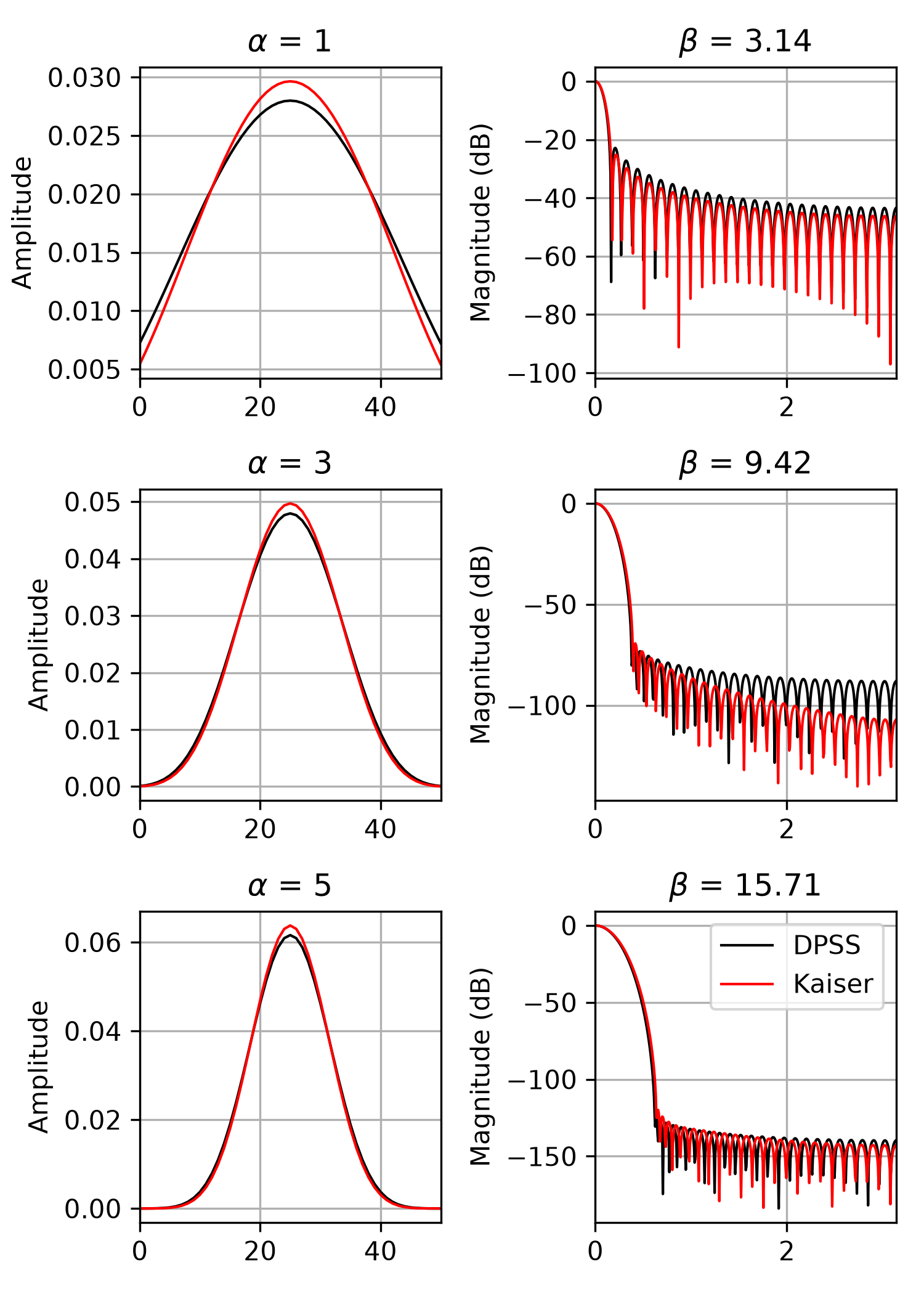
We can compare the window to `kaiser`, which was invented as an alternative that was easier to calculate [3]_ (example adapted from `here <https://ccrma.stanford.edu/~jos/sasp/Kaiser_DPSS_Windows_Compared.html>`_):import numpy as np import matplotlib.pyplot as plt from scipy.signal import windows, freqz M = 51 fig, axes = plt.subplots(3, 2, figsize=(5, 7))✓
for ai, alpha in enumerate((1, 3, 5)):
    win_dpss = windows.dpss(M, alpha)
    beta = alpha*np.pi
    win_kaiser = windows.kaiser(M, beta)
    for win, c in ((win_dpss, 'k'), (win_kaiser, 'r')):
        win /= win.sum()
        axes[ai, 0].plot(win, color=c, lw=1.)
        axes[ai, 0].set(xlim=[0, M-1], title=rf'$\alpha$ = {alpha}',
                        ylabel='Amplitude')
        w, h = freqz(win)
        axes[ai, 1].plot(w, 20 * np.log10(np.abs(h)), color=c, lw=1.)
        axes[ai, 1].set(xlim=[0, np.pi],
                        title=rf'$\beta$ = {beta:0.2f}',
                        ylabel='Magnitude (dB)')
✗
[<matplotlib.lines.Line2D object at 0x7f3f68fd8440>]
[(0.0, 50.0), Text(0.5, 1.0, '$\\alpha$ = 1'), Text(0, 0.5, 'Amplitude')]
[<matplotlib.lines.Line2D object at 0x7f3f68fdba10>]
[(0.0, 3.141592653589793), Text(0.5, 1.0, '$\\beta$ = 3.14'), Text(0, 0.5, 'Magnitude (dB)')]
[<matplotlib.lines.Line2D object at 0x7f3f68fd9d30>]
[(0.0, 50.0), Text(0.5, 1.0, '$\\alpha$ = 1'), Text(0, 0.5, 'Amplitude')]
[<matplotlib.lines.Line2D object at 0x7f3f68fda120>]
[(0.0, 3.141592653589793), Text(0.5, 1.0, '$\\beta$ = 3.14'), Text(0, 0.5, 'Magnitude (dB)')]
[<matplotlib.lines.Line2D object at 0x7f3f68fd96a0>]
[(0.0, 50.0), Text(0.5, 1.0, '$\\alpha$ = 3'), Text(0, 0.5, 'Amplitude')]
[<matplotlib.lines.Line2D object at 0x7f3f68fdbcb0>]
[(0.0, 3.141592653589793), Text(0.5, 1.0, '$\\beta$ = 9.42'), Text(0, 0.5, 'Magnitude (dB)')]
[<matplotlib.lines.Line2D object at 0x7f3f68fdbb60>]
[(0.0, 50.0), Text(0.5, 1.0, '$\\alpha$ = 3'), Text(0, 0.5, 'Amplitude')]
[<matplotlib.lines.Line2D object at 0x7f3f68fdacf0>]
[(0.0, 3.141592653589793), Text(0.5, 1.0, '$\\beta$ = 9.42'), Text(0, 0.5, 'Magnitude (dB)')]
[<matplotlib.lines.Line2D object at 0x7f3f68fda900>]
[(0.0, 50.0), Text(0.5, 1.0, '$\\alpha$ = 5'), Text(0, 0.5, 'Amplitude')]
[<matplotlib.lines.Line2D object at 0x7f3f68fd9e80>]
[(0.0, 3.141592653589793), Text(0.5, 1.0, '$\\beta$ = 15.71'), Text(0, 0.5, 'Magnitude (dB)')]
[<matplotlib.lines.Line2D object at 0x7f3f68fd97f0>]
[(0.0, 50.0), Text(0.5, 1.0, '$\\alpha$ = 5'), Text(0, 0.5, 'Amplitude')]
[<matplotlib.lines.Line2D object at 0x7f3f68fd8ad0>]
[(0.0, 3.141592653589793), Text(0.5, 1.0, '$\\beta$ = 15.71'), Text(0, 0.5, 'Magnitude (dB)')]
for ax in axes.ravel():
    ax.grid(True)
✓
axes[2, 1].legend(['DPSS', 'Kaiser'])
✗<matplotlib.legend.Legend object at 0x7f3f68fda510>
fig.tight_layout()
plt.show()
✓
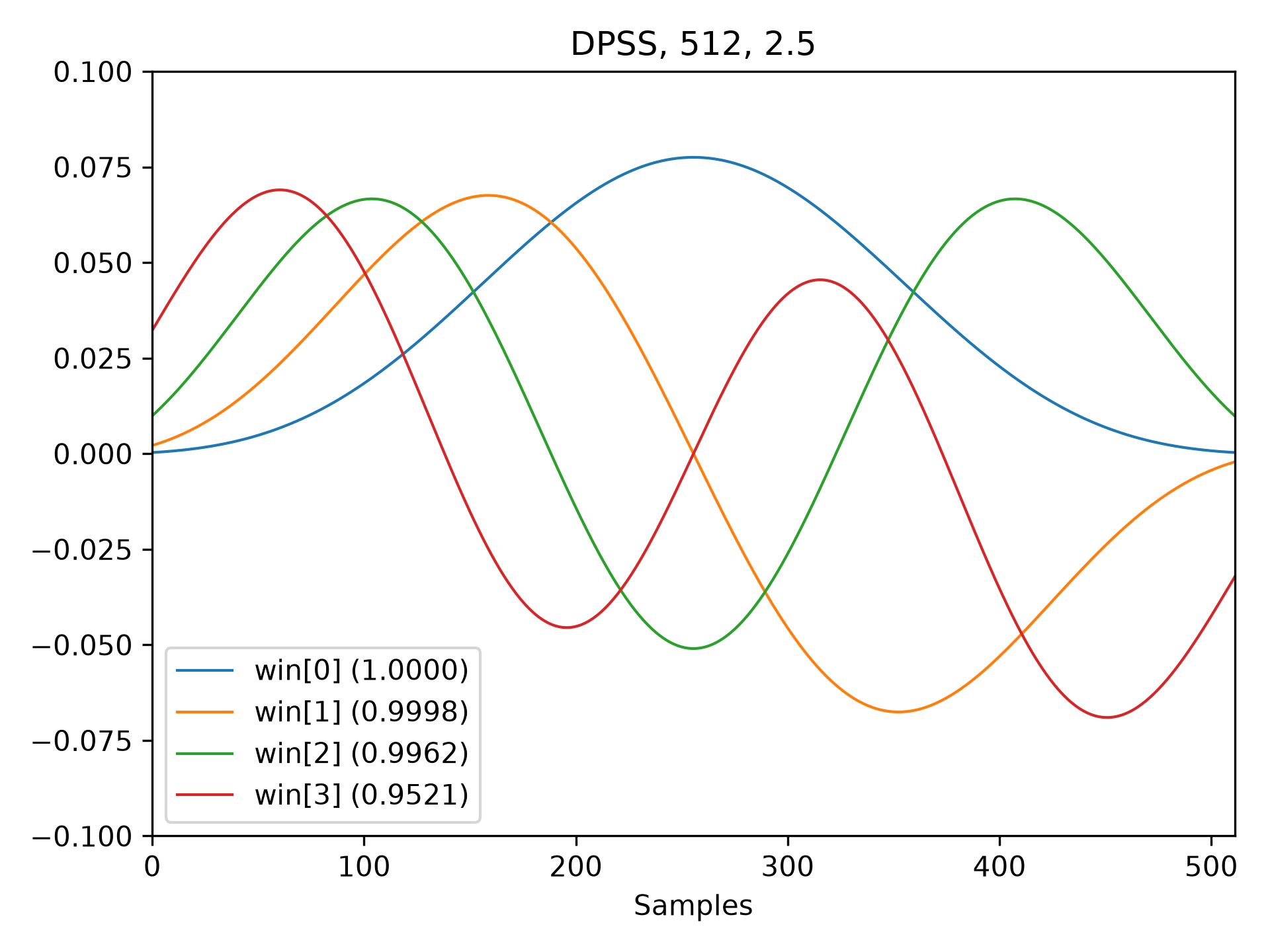
M = 512
NW = 2.5
win, eigvals = windows.dpss(M, NW, 4, return_ratios=True)
fig, ax = plt.subplots(1)
✓
ax.plot(win.T, linewidth=1.)
ax.set(xlim=[0, M-1], ylim=[-0.1, 0.1], xlabel='Samples',
       title=f'DPSS, {M:d}, {NW:0.1f}')
ax.legend([f'win[{ii}] ({ratio:0.4f})'
           for ii, ratio in enumerate(eigvals)])
✗
<matplotlib.legend.Legend object at 0x7f3f68867620>
fig.tight_layout()
plt.show()
✓
Ms = np.arange(1, 41)
factors = (50, 20, 10, 5, 2.0001)
energy = np.empty((3, len(Ms), len(factors)))
for mi, M in enumerate(Ms):
    for fi, factor in enumerate(factors):
        NW = M / float(factor)
        # Corrected using empirical approximation (default)
        win = windows.dpss(M, NW)
        energy[0, mi, fi] = np.sum(win ** 2) / np.sqrt(M)
        # Corrected using subsample shifting
        win = windows.dpss(M, NW, norm='subsample')
        energy[1, mi, fi] = np.sum(win ** 2) / np.sqrt(M)
        # Uncorrected (using l-infinity norm)
        win /= win.max()
        energy[2, mi, fi] = np.sum(win ** 2) / np.sqrt(M)
fig, ax = plt.subplots(1)
hs = ax.plot(Ms, energy[2], '-o', markersize=4,
             markeredgecolor='none')
leg = [hs[-1]]
for hi, hh in enumerate(hs):
    h1 = ax.plot(Ms, energy[0, :, hi], '-o', markersize=4,
                 color=hh.get_color(), markeredgecolor='none',
                 alpha=0.66)
    h2 = ax.plot(Ms, energy[1, :, hi], '-o', markersize=4,
                 color=hh.get_color(), markeredgecolor='none',
                 alpha=0.33)
    if hi == len(hs) - 1:
        leg.insert(0, h1[0])
        leg.insert(0, h2[0])
✓
ax.set(xlabel='M (samples)', ylabel=r'Power / $\sqrt{M}$')
ax.legend(leg, ['Uncorrected', r'Corrected: $\frac{M^2}{M^2+NW}$',
                'Corrected (subsample)'])
✗
<matplotlib.legend.Legend object at 0x7f3f687ca270>
fig.tight_layout()
✓Aliases
scipy.signal.windows.dpss