bundles / scipy 2.0.0.dev0+git20260907.41eeb59 / scipy / signal / windows / _windows / hann
function
scipy.signal.windows._windows:hann
source: build-install/usr/lib/python3.14/site-packages/scipy/signal/windows/_windows.py:878
Signature
def hann(M, sym = True, *, xp = None, device = None)Summary
Return a Hann window.
Extended Summary
The Hann window is a taper formed by using a raised cosine or sine-squared with ends that touch zero.
Parameters
M: intNumber of points in the output window. If zero, an empty array is returned. An exception is thrown when it is negative.
sym: bool, optionalWhen
True(default), generates a symmetric window, for use in filter design. WhenFalse, generates a periodic window, for use in spectral analysis.xp: array_namespace, optionalOptional array namespace. Should be compatible with the array API standard, or supported by array-api-compat. Default:
numpydevice: anyoptional device specification for output. Should match one of the supported device specification in
xp.
Returns
w: ndarrayThe window, with the maximum value normalized to 1 (though the value 1 does not appear if
Mis even andsymisTrue).
Notes
The symmetric -point Hann window is defined as
whereas the periodic -point Hann window is given by
The window was named for Julius von Hann, an Austrian meteorologist. It is also known as the Cosine Bell. It is sometimes erroneously referred to as the "Hanning" window, from the use of "hann" as a verb in the original paper and confusion with the very similar Hamming window.
Most references to the Hann window come from the signal processing literature, where it is used as one of many windowing functions for smoothing values. It is also known as an apodization (which means "removing the foot", i.e., smoothing discontinuities at the beginning and end of the sampled signal) or tapering function.
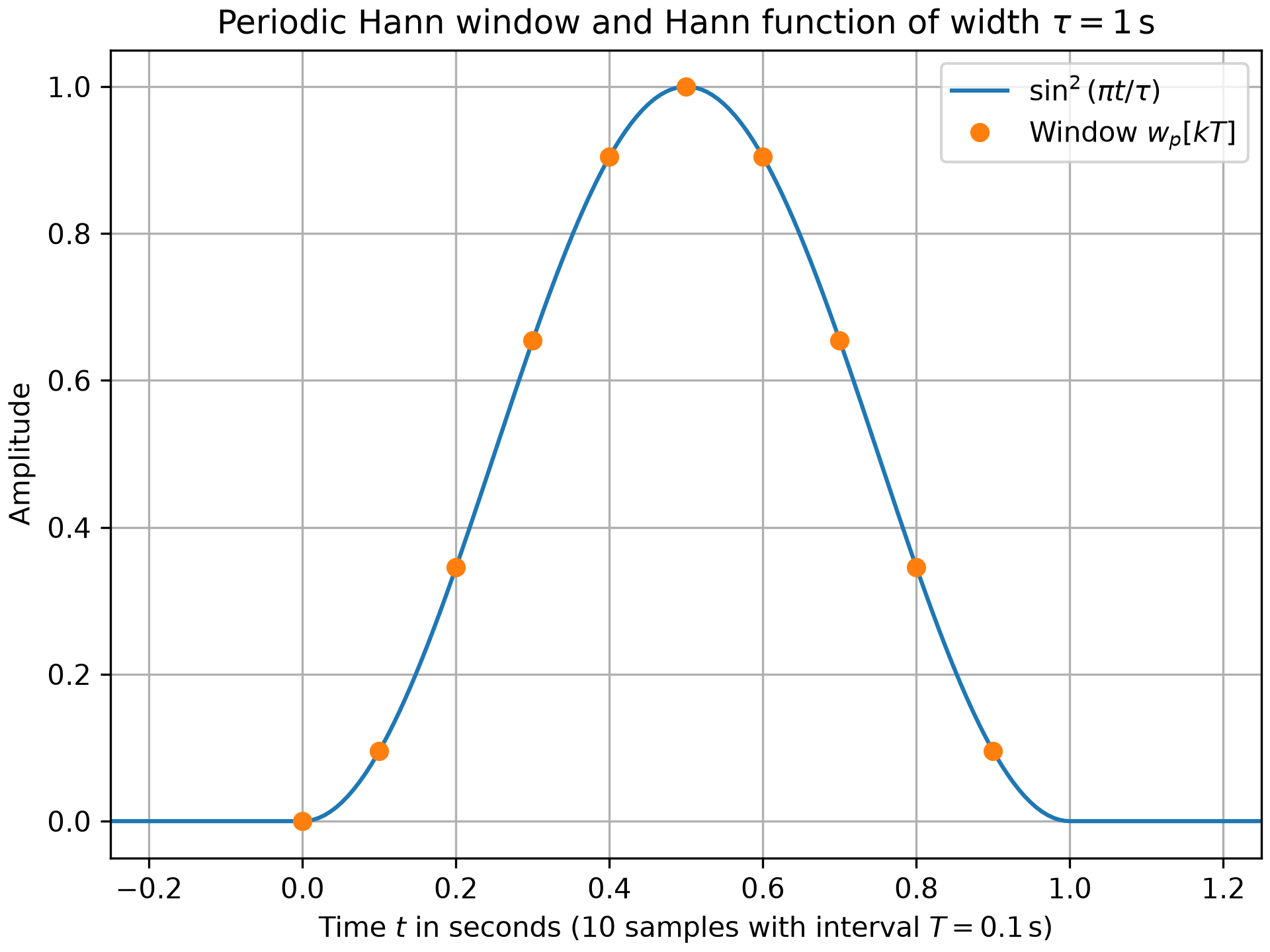
The corresponding continuous-time function is given by
which is centered at and has the width of . Here, denotes the sampling interval. Its Fourier transform can be expressed by
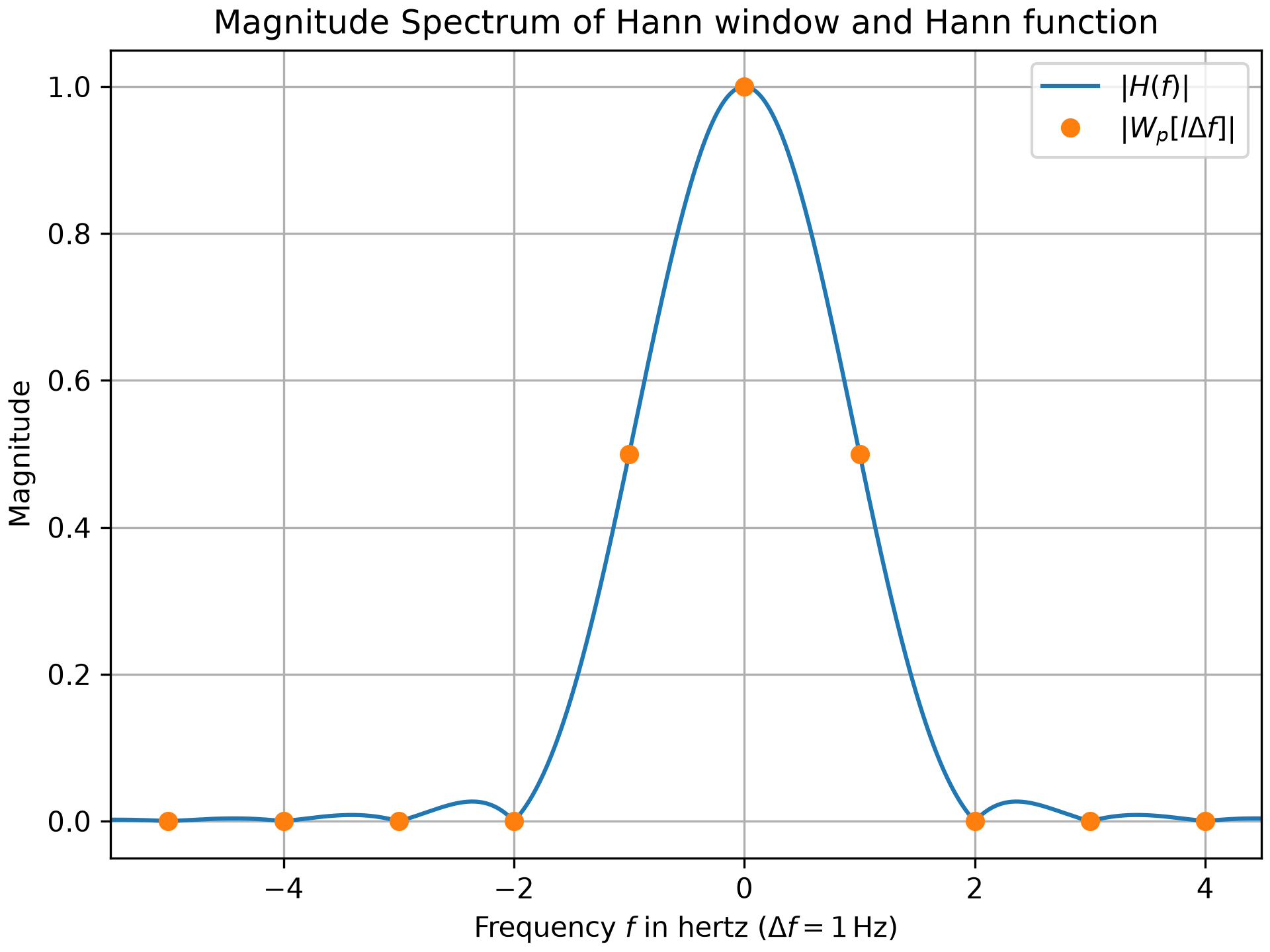
with . Eq. eq_FFT_SamplingFourierTrafo in the tutorial_FFT_DFT section of the user_guide can be used to determine the values of the discrete Fourier transform (aka FFT), i.e.,
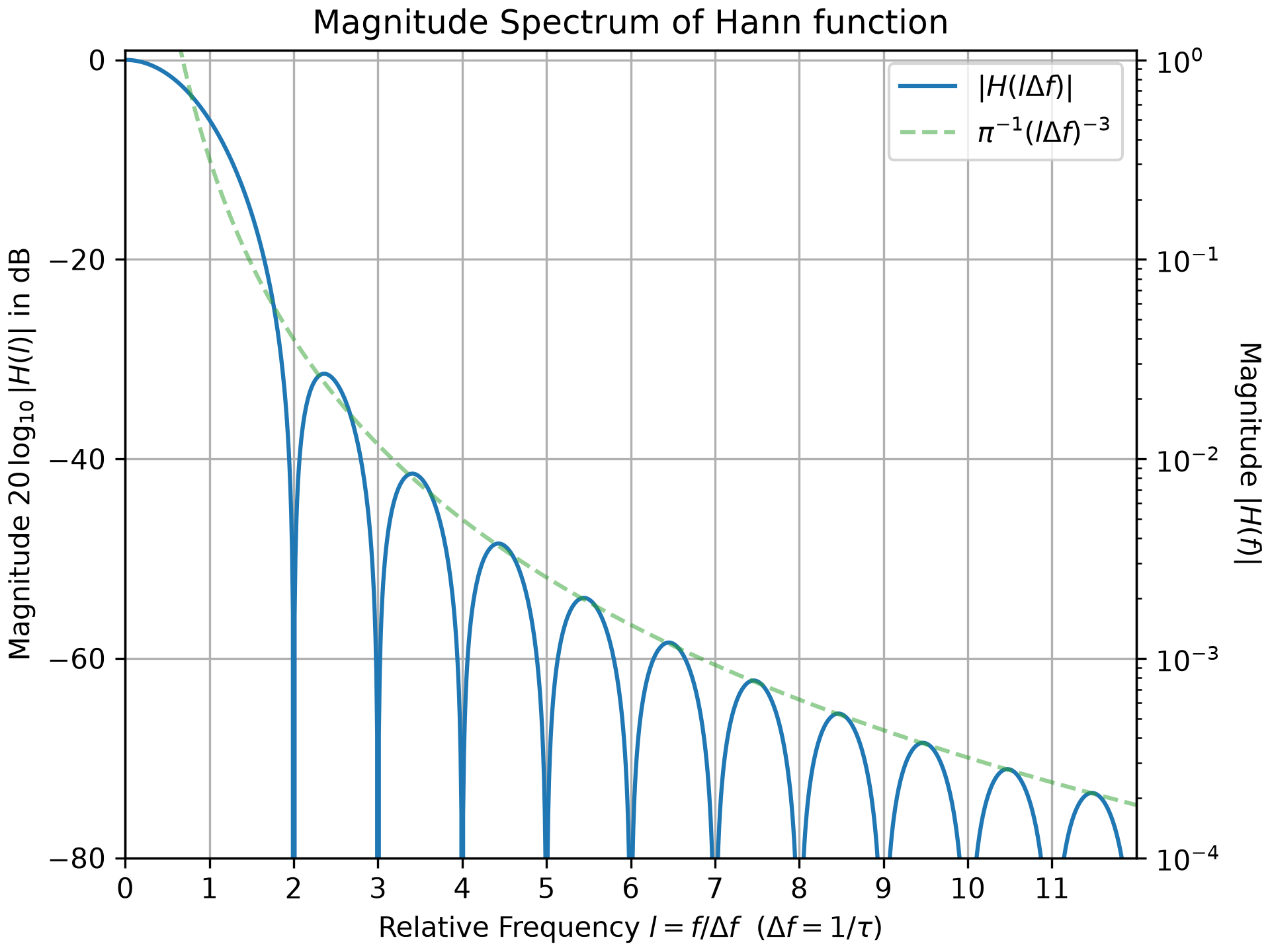
Here, is the FFT normalization constant (default: ). For , the values of are given by: , and for . The height of the sidelobes decreases on the order of .
For many applications, like calculating a magnitude spectrum in the example below, a normalized window is needed. Consult the tutorial_SpectralAnalysis section of the user_guide for details.
Examples
The following example compares the magnitude spectra of a periodic 10-point Hann window to its continuous-time counterpart.import numpy as np from matplotlib import pyplot as plt from scipy.fft import fft, fftfreq from scipy.signal.windows import hann M, T = 10, 1/10 # number of samples and sampling interval in seconds k, tau = np.arange(M) * T, M*T # sample times and window width in seconds w_k = hann(M, sym=False) # periodic hann window W, f_W = fft(w_k) / sum(w_k), fftfreq(M, T) # amplitude spectrum of w_k t = np.linspace(-.25, M*T+.25, 200, endpoint=True) h = np.where(np.logical_and(0 < t, t < 1), np.sin(np.pi * t / tau) ** 2, 0) f = np.linspace(-6, 12., 1801, endpoint=True) H, ii0 = np.zeros_like(f), abs(f * tau) != 1 H[ii0] = np.sinc(f[ii0] * tau) / ((f[ii0] * tau + 1) * (f[ii0] * tau - 1)) H[~ii0] = 0.5 # value when denominator is zero ii1 = np.logical_and(min(f_W) - 0.5 <= f, f < max(f_W) + 0.5) H_abs, f_abs, H1, f_dB = abs(H[ii1]), f[ii1], abs(H[f>=0]), f[f>=0] H_dB = np.where(~np.logical_and(f_dB>=2, np.mod(f_dB, 1)==0), 20*np.log10(H1), -1e250) ax0, ax1, ax2 = (plt.subplots(num=n_, constrained_layout=True)[1] for n_ in range(3))✓
ax0.set_title(r"Periodic Hann window and Hann function of width $\tau=1\,$s")
ax0.set(ylabel="Amplitude", xlim=(t[0], t[-1]),
        xlabel=rf"Time $t$ in seconds (${M}$ samples with interval ${T=}\,$s)")
ax0.plot(t, h, 'C0-', label=r"$\sin^2(\pi t / \tau)$")
ax0.plot(k, w_k, 'C1o', label="Window $w_p[kT]$")
ax1.set_title(r"Magnitude Spectrum of Hann window and Hann function")
ax1.set(ylabel="Magnitude", xlim=(f_abs[0], f_abs[-1]),
        xlabel=rf"Frequency $f$ in hertz ($\Delta f = {f_W[1]:g}\,$Hz)")
ax1.plot(f_abs, H_abs, 'C0-', label="$|H(f)|$")
ax1.plot(f_W, abs(W), 'C1o', label=r"$|W_p[l\Delta f]|$")
ax2.set_title(r"Magnitude Spectrum of Hann function")
ax2.set(ylabel=r"Magnitude $20\,\log_{10} |H(l)|$ in dB",
        xlabel=r"Relative Frequency $l=f/\Delta f\ $ ($\Delta f = 1/\tau$)",
        xlim=(f_dB[0], f_dB[-1]), ylim=(-80, 1),
        yticks=20*np.arange(-4, 1), xticks=np.arange(12))
✗
[Text(0, 0.5, 'Magnitude $20\\,\\log_{10} |H(l)|$ in dB'), Text(0.5, 0, 'Relative Frequency $l=f/\\Delta f\\ $ ($\\Delta f = 1/\\tau$)'), (0.0, 12.0), (-80.0, 1.0), [<matplotlib.axis.YTick object at 0x7f3f43cadf90>, <matplotlib.axis.YTick object at 0x7f3f43cacf50>, <matplotlib.axis.YTick object at 0x7f3f43caccd0>, <matplotlib.axis.YTick object at 0x7f3f43cad6d0>, <matplotlib.axis.YTick object at 0x7f3f58a9efd0>], [<matplotlib.axis.XTick object at 0x7f3f43cad810>, <matplotlib.axis.XTick object at 0x7f3f58a9ead0>, <matplotlib.axis.XTick object at 0x7f3f58a9d810>, <matplotlib.axis.XTick object at 0x7f3f58a9c2d0>, <matplotlib.axis.XTick object at 0x7f3f58a9f110>, <matplotlib.axis.XTick object at 0x7f3f58a9d1d0>, <matplotlib.axis.XTick object at 0x7f3f58a9c910>, <matplotlib.axis.XTick object at 0x7f3f58a9e210>, <matplotlib.axis.XTick object at 0x7f3f58a9f390>, <matplotlib.axis.XTick object at 0x7f3f58a9ec10>, <matplotlib.axis.XTick object at 0x7f3f58a9c690>, <matplotlib.axis.XTick object at 0x7f3f58a9de50>]]
ax2a = ax2.twinx() # create right y-axis with non-logarithmic scaling:
✓ax2a.set_ylabel("Magnitude $|H(f)|$", rotation=-90, labelpad=15) ax2a.set(ylim=(1e-4, 10 ** (1 / 20)), yscale="log") ax2.plot(f_dB, H_dB, 'C0-', label=r"$|H(l\Delta f)|$") ax2.plot(f_dB[f_dB>0.5], -60*np.log10(f_dB[f_dB>0.5]) - 20*np.log10(np.pi), 'C2--', alpha=0.5, label=r"$\pi^{-1} (l\Delta f)^{-3}$") for ax_ in (ax0, ax1, ax2): ax_.legend(loc='best') ax_.grid(True)✗
<matplotlib.legend.Legend object at 0x7f3f43c60590>
<matplotlib.legend.Legend object at 0x7f3f43be2e40>
<matplotlib.legend.Legend object at 0x7f3f43be3b60>
plt.show()
✓
Aliases
scipy.signal.windows.hann