bundles / scipy latest / scipy / signal / _filter_design / freqs
function
scipy.signal._filter_design:freqs
source: build-install/usr/lib/python3.14/site-packages/scipy/signal/_filter_design.py:177
Signature
def freqs(b, a, worN = 200, plot = None)Summary
Compute frequency response of analog filter.
Extended Summary
Given the M-order numerator b and N-order denominator a of an analog filter, compute its frequency response
        b[0]*(jw)**M + b[1]*(jw)**(M-1) + ... + b[M]
H(w) = ----------------------------------------------
        a[0]*(jw)**N + a[1]*(jw)**(N-1) + ... + a[N]
Parameters
b: array_likeNumerator of a linear filter.
a: array_likeDenominator of a linear filter.
worN: {None, int, array_like}, optionalIf None, then compute at 200 frequencies around the interesting parts of the response curve (determined by pole-zero locations). If a single integer, then compute at that many frequencies. Otherwise, compute the response at the angular frequencies (e.g., rad/s) given in
worN.plot: callable, optionalA callable that takes two arguments. If given, the return parameters w and h are passed to plot. Useful for plotting the frequency response inside freqs.
Returns
w: ndarrayThe angular frequencies at which h was computed.
h: ndarrayThe frequency response.
Notes
Using Matplotlib's "plot" function as the callable for plot produces unexpected results, this plots the real part of the complex transfer function, not the magnitude. Try lambda w, h: plot(w, abs(h)).
Examples
from scipy.signal import freqs, iirfilter
import numpy as np
✓
b, a = iirfilter(4, [1, 10], 1, 60, analog=True, ftype='cheby1')
✓w, h = freqs(b, a, worN=np.logspace(-1, 2, 1000))
✓import matplotlib.pyplot as plt
✓plt.semilogx(w, 20 * np.log10(abs(h))) plt.xlabel('Frequency [rad/s]') plt.ylabel('Amplitude response [dB]')✗
Text(0, 0.5, 'Amplitude response [dB]')
plt.grid(True)
plt.show()
✓
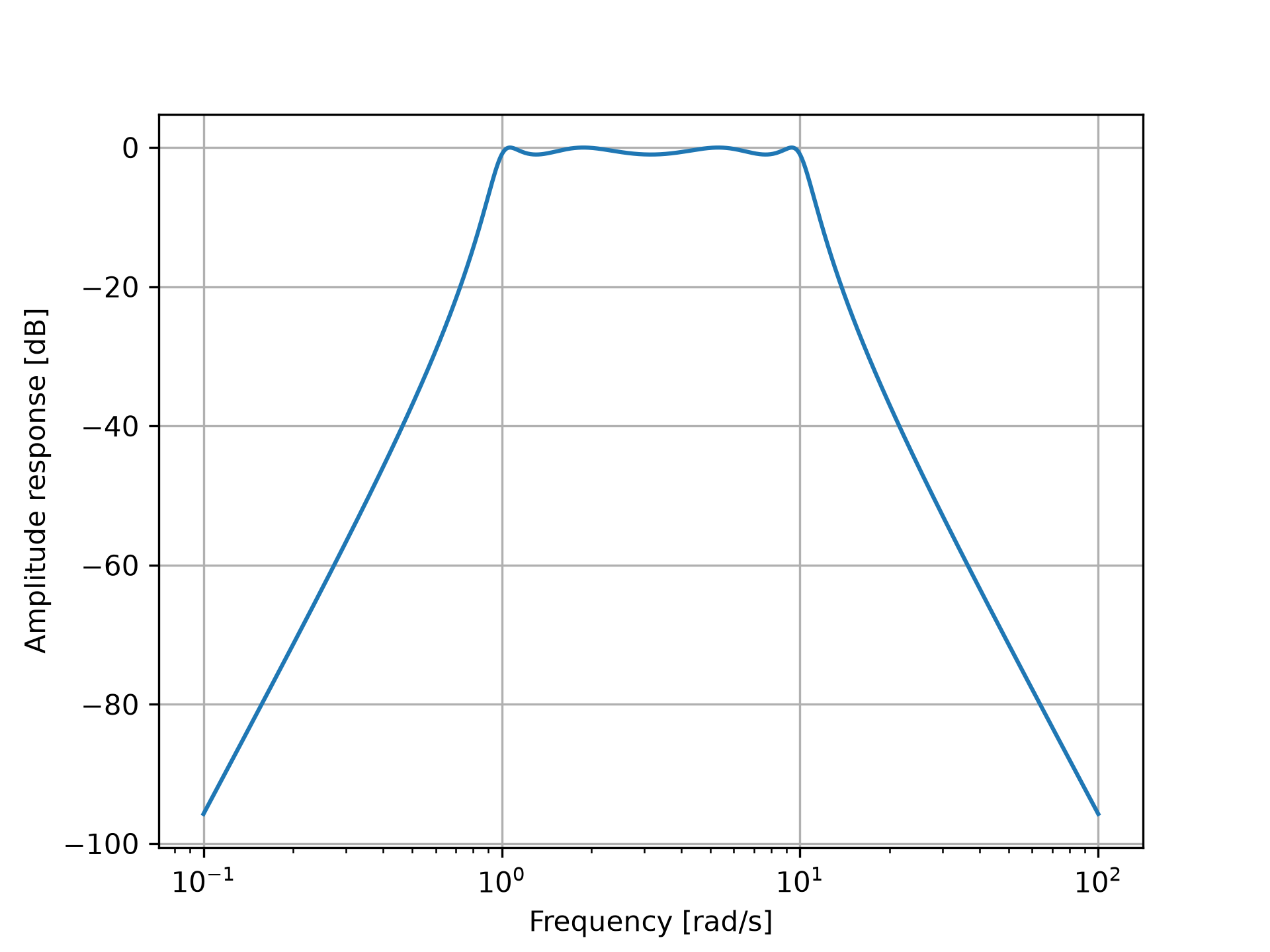
See also
- freqz
Compute the frequency response of a digital filter.
Aliases
scipy.signal.freqs